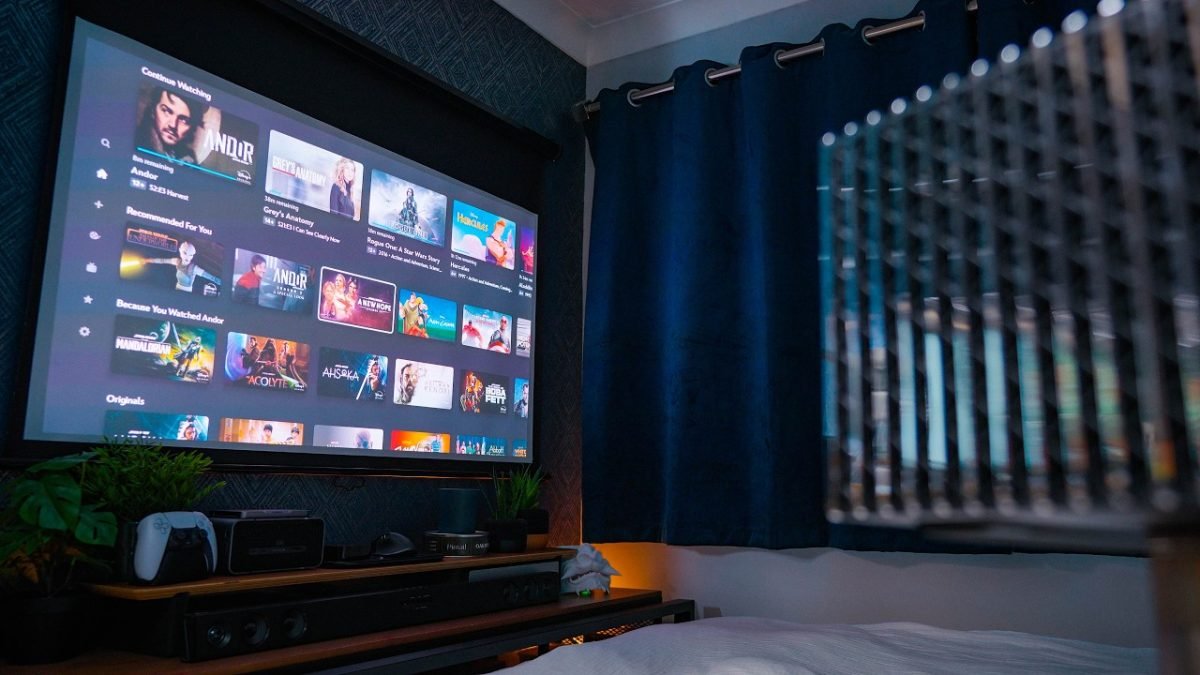
Imagine turning your bedroom into the ultimate entertainment spot where every movie night feels like a front-row experience. Setting up a bedroom projector can transform your space, giving you big-screen thrills without leaving your cozy sanctuary.
Whether you want to watch your favorite shows, play games, or enjoy a relaxing movie marathon, the right projector setup makes all the difference. Ready to learn how to create your perfect viewing environment? Keep reading, and discover the simple steps to bring cinema magic right into your bedroom.

Credit: www.reddit.com
Choosing The Right Projector
Setting up a projector in your bedroom can create a cozy movie space. Choosing the right projector is important for a good experience.
This guide will help you understand key factors to consider before buying a projector for your bedroom.
Types Of Projectors
There are several types of projectors. Each uses different technology and suits different needs.
- LCD Projectors:Use liquid crystal displays for bright images. Good for colorful videos.
- DLP Projectors:Use mirrors to create images. Often smaller and more portable.
- LED Projectors:Use LED lights for long-lasting and energy-saving use.
- LCoS Projectors:Combine LCD and DLP features for sharp images. Usually more expensive.
Brightness And Resolution
Brightness is measured in lumens. Higher lumens work better in rooms with light. Resolution affects image clarity.
| Brightness (Lumens) | Best Use |
| Under 1000 | Dark rooms only |
| 1000 to 2000 | Dim to dark rooms |
| 2000+ | Rooms with some light |
| Resolution | Description |
| 720p (HD) | Basic quality for casual watching |
| 1080p (Full HD) | Clear and sharp images for movies |
| 4K | Very high detail, best for large screens |
Portability And Size
Consider where you will place the projector. Size and weight affect ease of moving and setting up.
Small projectors are easy to move and store. They often have fewer features and less brightness.
Larger projectors may offer better picture quality but need a fixed place.
Choose a size that fits your bedroom space and how often you want to move it.
Ideal Bedroom Setup
Setting up a projector in your bedroom can create a cozy and personal theater. The right setup improves your viewing experience. You need to consider your room space, screen position, and lighting.
This guide focuses on the ideal bedroom projector setup. It covers room size and layout, screen placement options, and lighting considerations.
Room Size And Layout
Measure your bedroom to know how much space you have for a projector setup. The layout affects where you place the projector and the screen.
- Small rooms need compact projectors with short throw distance.
- Larger rooms allow more flexibility in screen size and projector placement.
- Keep furniture placement in mind to avoid blocking the projector beam.
- Choose a wall or surface with minimal obstructions for the screen.
Screen Placement Options
Proper screen placement ensures clear and comfortable viewing. You can use a wall or a dedicated screen.
| Screen Type | Placement | Notes |
| Fixed Frame Screen | Mounted on wall | Best image stability and quality |
| Pull-Down Screen | Ceiling or wall-mounted | Can be hidden when not used |
| Painted Wall | Any flat wall | Low cost but less image quality |
Lighting Considerations
Lighting affects projector image brightness and clarity. Control lighting to get the best picture.
Use these tips for better lighting:
- Close curtains or blinds to block outside light.
- Use dimmable lamps instead of bright overhead lights.
- Place lights away from the screen to avoid glare.
- Consider blackout curtains for daytime viewing.
Selecting The Screen
Choosing the right screen is key for a good bedroom projector setup. The screen affects image quality and viewing comfort.
Consider your space, screen type, and materials before making a choice. This helps you get the best picture and use your projector well.
Fixed Vs. Portable Screens
Fixed screens mount on a wall or frame. They stay in one place and usually give a smooth, flat surface.
Portable screens can be moved or folded. They work well if you want to store the screen or use it in different rooms.
- Fixed screens provide a steady, wrinkle-free image.
- Portable screens offer flexibility and easy storage.
- Fixed screens usually cost more but last longer.
- Portable screens are cheaper and easy to set up.
Screen Materials And Gain
Screen material affects brightness and color. Gain shows how much light the screen reflects.
| Material | Description | Typical Gain |
| Matte White | Common, good color, wide viewing angle | 1.0 |
| High Gain | Brighter image, narrower viewing angle | 1.5 to 2.0 |
| Gray | Better contrast in bright rooms | 0.8 to 1.0 |
| Glass Beaded | Very bright, limited angle | 2.0+ |
Diy Screen Ideas
You can build your own screen with simple materials. This saves money and fits your space well.
- Use a smooth white wall for a basic screen.
- Stretch blackout cloth on a wooden frame for a flat surface.
- Paint a wall with special projector screen paint.
- Attach white blackout fabric to a roller for a retractable screen.
- Make a frame with PVC pipes and clip a white sheet over it.
Sound System Choices
Choosing the right sound system for your bedroom projector setup is important. Good sound makes movies and shows more enjoyable. You can pick from built-in speakers or add external audio devices.
Each option has its pros and cons. Think about your room size, budget, and sound quality needs before deciding.
Built-in Vs. External Speakers
Built-in speakers come with many projectors. They are easy to use and need no extra setup. But they often lack strong bass and clear sound.
External speakers offer better sound quality. You can choose from bookshelf speakers, powered speakers, or a full audio system. External speakers need cables or wireless connections.
- Built-in speakers: simple, compact, less powerful
- External speakers: better sound, more options
- External needs space and setup
Soundbar And Surround Sound
Soundbars are slim speakers that sit below the screen. They improve sound with less clutter. Many soundbars include built-in subwoofers for extra bass.
Surround sound systems use multiple speakers around the room. They create a 3D audio effect. This makes movies feel more real but needs more space and wires.
- Soundbars: easy setup, good for small rooms
- Surround sound: immersive, needs space
- Both improve projector audio greatly
Acoustic Treatments
Acoustic treatments help control sound in your room. They reduce echo and improve clarity. You can add foam panels, carpets, and curtains for better sound.
Proper treatment makes even simple speakers sound better. It also stops sound from disturbing others outside the room.
- Use foam panels on walls
- Add thick curtains or rugs
- Place soft furniture to absorb sound
Connecting Devices
Setting up a bedroom projector can enhance your viewing experience. Connecting the right devices is key to maximizing its potential.
Let’s explore how to connect streaming devices, gaming consoles, and manage cables efficiently.
Streaming Devices And Media Players
Streaming devices provide access to numerous apps and services. Connect them to your projector for endless entertainment.
- Use an HDMI cable to connect the device to the projector
- Ensure the projector is set to the correct input source
- Connect to Wi-Fi for streaming services
Gaming Consoles Setup
Gaming consoles offer a big-screen experience with your projector. Follow these steps to set it up:
| Console | Connection Method |
| PlayStation | HDMI |
| Xbox | HDMI |
| Nintendo Switch | Dock with HDMI |
Cable Management Tips
Neat cable management keeps your setup organized and safe. It also enhances the room’s appearance.
- Use cable ties to bundle cables together
- Label cables for easy identification
- Consider cable covers for a cleaner look
Optimizing Image Quality
A bedroom projector setup can create a great viewing experience. Optimizing image quality is key for clear and enjoyable visuals. Here are some tips to get the best picture quality.
Focus on calibration settings, aspect ratio, and reducing image distortion. These elements ensure a sharp and vibrant display.
Calibration Settings
Calibrating your projector settings improves image quality. Adjust brightness, contrast, and color temperature. Use a calibration tool if available. This balances the display for different lighting conditions.
Find a balance that makes images look natural. Avoid settings that are too bright or too dark.
- Brightness: Set for room lighting.
- Contrast: Enhance detail without loss.
- Color: Choose a natural tone.
Aspect Ratio And Zoom
The aspect ratio impacts how images fit on your screen. Common ratios are 16:9 and 4:3. Choose one that matches your content and screen size.
Zoom settings help fit the image to your screen. Adjust zoom to avoid cutting off edges. This ensures a full view without distortion.
| Aspect Ratio | Content Type |
| 16:9 | Widescreen movies |
| 4:3 | Older TV shows |
Reducing Image Distortion
Distortion affects image clarity. Use the keystone correction feature to fix this. It adjusts images that appear slanted or uneven.
Position the projector straight in front of the screen. This reduces the need for correction and keeps images sharp.
- Use keystone correction sparingly.
- Align the projector with the screen.
- Ensure the screen is flat.
Creating A Comfortable Viewing Space
Setting up a bedroom projector needs a cozy and relaxing space. Comfort helps you enjoy movies or shows longer.
Think about seating, lighting, and room feel. These parts make your viewing better and more pleasant.
Seating Arrangements
Choose seats that are soft and support your body well. Make sure seats face the screen directly.
Use cushions or bean bags for extra comfort. Arrange them to fit the room size and shape.
- Place seats about 8 to 12 feet from the screen
- Use reclining chairs or soft sofas
- Add throw pillows for neck and back support
- Keep enough space to move around easily
Ambient Lighting Control
Control light to avoid glare on the screen. Use dimmable lights or lamps with soft light.
Block outside light with curtains or blinds. This keeps the room dark for clear images.
- Install blackout curtains or thick blinds
- Use LED lights with adjustable brightness
- Place lights behind the screen or seating area
- Avoid bright ceiling lights during viewing
Decor And Atmosphere
Make the room feel warm and inviting. Use soft rugs, wall art, and cozy blankets.
Keep the decor simple to avoid distractions. Choose colors that relax your eyes and mind.
- Use dark or neutral wall colors to reduce light reflection
- Add soft rugs to absorb sound and add comfort
- Include simple artwork or movie posters
- Keep blankets or throws nearby for warmth

Credit: www.reddit.com
Maintenance And Troubleshooting
Keeping your bedroom projector working well needs regular care. Small problems can stop your projector from working. This guide helps you keep it clean and fix common issues.
Also, learn how to upgrade parts to get better performance. Proper care extends the life of your projector and improves your viewing experience.
Cleaning And Care
Dust and dirt can harm your projector. Clean it often to keep the picture clear. Use a soft cloth to wipe the lens and case gently. Avoid using liquids directly on the projector.
- Turn off and unplug the projector before cleaning.
- Use a microfiber cloth for the lens.
- Clean air vents with a soft brush or compressed air.
- Keep the projector in a dry place to avoid moisture damage.
Common Issues And Fixes
Projectors can have problems like no image, poor picture, or sound issues. Many problems have simple fixes you can try at home.
| Issue | Possible Cause | Fix |
|---|---|---|
| No image | Loose cables or wrong input | Check all cables and select correct input source |
| Blurry picture | Dirty lens or wrong focus | Clean lens and adjust focus ring |
| Overheating | Blocked air vents | Clear vents and clean air filters |
| No sound | Muted volume or wrong settings | Increase volume and check audio settings |
Upgrading Components
Upgrading parts can improve your projector’s performance. You can replace bulbs, upgrade speakers, or add better cables for clearer sound and image.
- Replace old bulbs with new ones for brighter images.
- Use HDMI cables instead of VGA for better video quality.
- Add external speakers for improved sound.
- Consider a cooling pad to prevent overheating.

Credit: www.reddit.com
Frequently Asked Questions
What Is The Best Projector For Bedroom Use?
The best bedroom projectors are compact, quiet, and have good resolution. Look for models with at least 1080p resolution and low noise. Portable LED projectors with adjustable brightness work well in small, cozy spaces. Consider compatibility with streaming devices for easy content access.
How Do I Mount A Projector In My Bedroom?
Mount your projector on the ceiling or a stable shelf. Ensure it aligns with the screen or wall for a clear image. Use adjustable mounts to fine-tune the angle and focus. Keep cables organized to maintain a clean setup and prevent tripping hazards.
What Screen Size Suits A Bedroom Projector Setup?
A 60 to 100-inch screen size is ideal for bedrooms. It balances immersive viewing without overwhelming the room. Measure your wall space and viewing distance to choose the right size. Portable projector screens or painted walls can serve as effective surfaces.
How To Optimize Bedroom Lighting For Projector Use?
Dim or turn off lights for the best projector image quality. Use blackout curtains to reduce outside light interference. Avoid direct light on the screen to prevent glare. Consider warm, indirect lighting elsewhere to maintain comfort without affecting the picture.
Conclusion
A bedroom projector setup brings movies and shows to life. It fits small spaces and creates a cozy feel. Choose the right projector and screen for best results. Keep cables tidy and lighting low for clear images. Adjust sound for a better experience.
Enjoy your favorite films anytime without leaving bed. This setup makes relaxing evenings simple and fun. Try it, and see how it changes your room’s vibe. A small change can make a big difference in home entertainment.