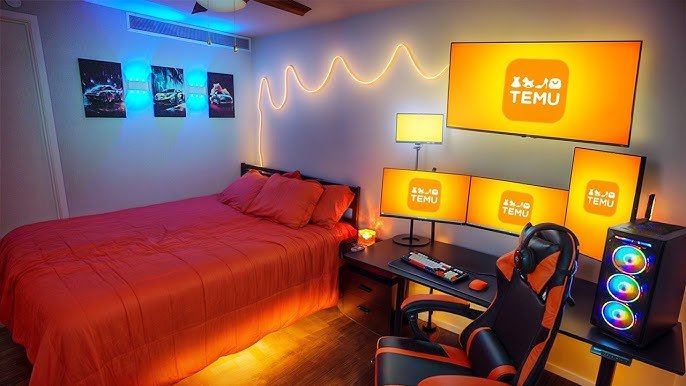
Imagine stepping into your bedroom and instantly feeling the thrill of your favorite game waiting for you. Your bedroom with a gaming setup isn’t just a place to sleep—it’s your personal arena, your escape, and your creative hub all in one.
Whether you’re a casual player or a hardcore gamer, creating the perfect gaming space in your bedroom can boost your focus, comfort, and overall experience. Ready to transform your room into the ultimate gaming zone that fits your style and needs?
Let’s dive into how you can make that happen.
Choosing The Right Space
Picking the right spot in your bedroom for gaming is important. It helps you enjoy your games and stay comfortable.
Think about space size, noise levels, and how you move around. These affect your gaming experience and rest.
Maximizing Room Layout
Use your room’s shape well to fit gaming gear and bedroom furniture. Keep space for moving and relaxing.
- Place your desk near a wall to save space.
- Keep cables tidy to avoid clutter.
- Use shelves to store games and accessories.
- Choose furniture that fits your room size.
- Leave enough room for your chair to move freely.
Lighting For Gaming And Relaxation
Good lighting helps you see the screen and relax your eyes. Use different lights for gaming and resting.
| Lighting Type | Purpose | Tips |
| Ambient Light | General room light | Use soft, warm bulbs for calmness |
| Task Light | Focused on gaming desk | Use adjustable LED lamps to reduce glare |
| Accent Light | Decorative and mood setting | Try colored LEDs to match your style |

Credit: xrockergaming.com
Ergonomic Furniture
Creating a bedroom with a gaming setup means choosing furniture that supports long hours of play. Ergonomic furniture helps keep your body comfortable and prevents pain.
Good furniture improves posture and focus. It also makes your gaming space feel organized and inviting.
Selecting A Comfortable Gaming Chair
A gaming chair must support your back and neck well. Look for adjustable features to fit your body size and shape.
- Choose chairs with lumbar support to protect your lower back.
- Adjust height so your feet rest flat on the floor.
- Pick chairs with padded armrests to reduce shoulder strain.
- Look for breathable material to keep you cool.
- Ensure the chair can swivel and roll smoothly for easy movement.
Desk Options For Efficiency
Your desk should give enough space and keep your gaming gear within reach. Different desk types suit different room sizes and styles.
| Desk Type | Benefits | Considerations |
| Standard Desk | Simple design, good surface area | May lack cable management |
| L-Shaped Desk | More workspace, fits corner rooms | Takes up more floor space |
| Adjustable Standing Desk | Allows sitting or standing | Usually more expensive |
| Wall-Mounted Desk | Saves floor space | Limited surface area |
Tech Essentials
A bedroom with a gaming setup needs the right technology. Good gear makes gaming fun and smooth.
This guide covers the key hardware and tips for keeping cables tidy in your gaming space.
High-performance Hardware
Choose a fast processor and a strong graphics card. These parts help games run well.
- Use at least 16GB of RAM for smooth gameplay.
- Pick a solid-state drive (SSD) for quick loading times.
- Select a monitor with a high refresh rate for clear images.
- Invest in a good gaming mouse and keyboard for better control.
Cable Management Tips
Keep cables organized to avoid clutter and damage. It also helps with airflow and cleaning.
| Tip | Description |
| Label Cables | Use tags to mark each cable for easy identification. |
| Use Cable Ties | Bundle cables together to keep them neat and secure. |
| Hide Cables | Run wires behind the desk or use cable covers. |
| Regular Checks | Inspect cables often to avoid wear and tear. |

Credit: www.youtube.com
Sound And Acoustics
Good sound and acoustics make gaming more fun and immersive. A bedroom with a gaming setup needs clear sound for better gameplay.
Proper sound helps you hear game details and chat with friends. It also keeps noise from bothering others in the house.
Speaker Vs. Headset
Speakers fill the room with sound. They create a natural and open audio experience for gaming.
Headsets give direct sound to your ears. They block outside noise and help you focus on the game.
- Speakers let you share sound with others nearby.
- Headsets provide clear audio and voice chat.
- Speakers can cause noise for others in the house.
- Headsets reduce sound leakage and distractions.
- Speakers need room space and good placement.
- Headsets are portable and easy to wear.
Soundproofing Ideas
Soundproofing helps keep game noise inside your bedroom. It also stops outside sounds from interrupting your game.
Simple steps can improve your room’s acoustics and reduce noise for others in your home.
- Use thick curtains to absorb sound from windows.
- Place rugs or carpets on the floor to reduce echo.
- Add foam panels or blankets on walls for sound dampening.
- Seal gaps around doors and windows to block noise.
- Use bookshelves or furniture to break sound waves.
- Keep the gaming area away from thin walls or shared spaces.
Ambient Enhancements
A bedroom with a gaming setup needs the right mood. Ambient lighting and decor create a cozy space. These elements help you relax and focus during play.
Smart choices in lighting and decoration improve your gaming experience. They set the tone and make the room inviting.
Led Lighting Tricks
LED lights add color and depth to your gaming space. Place them behind your monitor or along shelves. Use soft colors to reduce eye strain.
- Install strip lights under the desk for a glow.
- Use color-changing LEDs to match game themes.
- Add LED bulbs inside shelves to highlight decor.
- Choose dimmable LEDs to control brightness.
- Sync lights with your games for dynamic effects.
Decor To Boost Mood
Decor affects how you feel in your room. Pick items that inspire calm and focus. Personal touches make the space yours.
| Decor Item | Effect on Mood |
| Plants | Relaxation and fresh air |
| Posters | Inspiration and energy |
| Soft rugs | Comfort and warmth |
| Minimal clutter | Focus and calmness |

Credit: www.lorddecor.com
Storage Solutions
Creating a bedroom with a gaming setup requires smart storage solutions. Proper organization helps maintain a tidy space and enhances gaming experience.
Utilizing the right storage solutions keeps your games and accessories easily accessible. This setup also optimizes space in your bedroom.
Organizing Games And Accessories
Keeping your games and accessories in order is crucial. Consider the options available for efficient storage.
- Use labeled boxes to categorize games
- Install wall hooks for headphones and controllers
- Employ drawer organizers for small items
Multi-functional Shelving
Multi-functional shelving systems are versatile. They offer excellent solutions for storing gaming gear and other bedroom essentials.
Consider these shelving ideas:
- Floating shelves for a modern look
- Adjustable shelves for flexibility
- Corner shelves to maximize space
| Shelf Type | Benefits |
| Floating Shelves | Saves floor space |
| Adjustable Shelves | Customizable heights |
| Corner Shelves | Utilizes corners |
Comfort And Health
Creating a bedroom with a gaming setup requires attention to comfort and health. Gamers spend long hours in front of screens, so it’s important to consider both posture and physical well-being.
Ensuring a comfortable gaming environment can prevent health issues and improve the overall experience. Proper posture and regular breaks are key components of a healthy gaming routine.
Posture Tips
Maintaining good posture is crucial for gamers. It helps prevent back and neck pain. Set up your chair and monitor correctly to support your body.
Your screen should be at eye level. Keep your feet flat on the floor. Sit back in your chair for full support.
- Use a chair with lumbar support
- Keep wrists straight while using the keyboard
- Avoid slouching to reduce strain on your back
Break And Stretch Routines
Regular breaks are important to keep your body healthy. Stretching helps reduce tension and improve circulation.
Take short breaks every hour. Stand up and stretch your arms, legs, and back. This keeps your body flexible and energized.
- Stand and walk around for a few minutes
- Stretch your neck and shoulders to relieve tension
- Rotate your wrists and ankles to improve joint flexibility
Frequently Asked Questions
What Is The Best Gaming Setup For A Bedroom?
A compact desk with good cable management works best. Add ergonomic chair, quality monitor, and ambient lighting. Keep space organized and clutter-free for comfort and focus during gaming sessions.
How To Optimize Bedroom Lighting For Gaming?
Use adjustable LED lights to reduce glare and eye strain. Ambient lighting behind the monitor enhances immersion. Avoid harsh overhead lights; opt for soft, diffused lighting instead.
What Are Essential Furniture Pieces For Gaming Bedrooms?
A sturdy desk, ergonomic chair, and storage units are essential. Shelving helps organize games and accessories. Comfortable seating and proper desk height improve posture and gaming performance.
How To Manage Cables In A Gaming Bedroom?
Use cable clips, sleeves, or raceways to bundle cables neatly. Label wires for easy identification. Keep power strips accessible but hidden to avoid clutter and hazards.
Conclusion
A bedroom with a gaming setup creates a perfect personal space. It helps you relax and enjoy your favorite games. Good lighting and organized cables make a big difference. Choose comfortable furniture to stay focused longer. Add some decorations to make the space yours.
A tidy room also improves your mood and game skills. Small changes can bring big improvements. Your gaming bedroom can be both fun and restful. Start planning today and build your ideal gaming spot.