Imagine turning your bedroom into the ultimate cozy retreat where you can watch your favorite shows or movies without any hassle. Setting up a bedroom TV might seem simple, but getting it just right can change how you relax at the end of the day.
Whether you want the perfect screen size, the best viewing angle, or a setup that doesn’t take up too much space, this guide will help you create a setup that fits your style and needs. Ready to transform your bedroom into your personal entertainment haven?
Let’s dive in and make your TV setup exactly how you want it.

Credit: www.reddit.com
Choosing The Right Tv
Selecting the right TV for your bedroom is important. It helps you enjoy shows and movies comfortably.
Think about size, picture quality, and extra features before buying a TV.
Screen Size And Viewing Distance
Pick a TV size that fits your room well. Too big or too small can be uncomfortable.
The distance between your bed and TV affects the size you need. A good rule helps choose right.
- Sit about 1.5 to 2.5 times the screen size away from the TV
- For example, a 40-inch TV fits well at 5 to 8 feet distance
- Make sure the TV does not block walking space or look awkward
Resolution And Picture Quality
High resolution means clearer pictures. It makes watching more enjoyable.
Look for Full HD or 4K TVs for sharp images. Brightness and color accuracy matter too.
- Full HD (1080p) is good for smaller bedrooms
- 4K resolution offers more detail for larger screens
- Choose TVs with good contrast and color settings
Smart Tv Features
Smart TVs connect to the internet. You can watch streaming apps directly on the TV.
Check for easy-to-use menus and popular app support. Voice control can add convenience.
- Built-in Wi-Fi for wireless internet connection
- Support for apps like Netflix, YouTube, and Hulu
- Options for voice commands or remote control apps

Credit: www.lorddecor.com
Ideal Tv Placement
Setting up your bedroom TV correctly improves your viewing experience. The right placement helps reduce eye strain and makes watching more comfortable.
This guide covers the best spots for your TV. It explains wall mounting, stand placement, viewing height, and how to avoid glare.
Wall Mounting Vs. Stand Placement
Wall mounting saves space and gives a clean look. It can be fixed at a perfect height but may limit moving the TV.
Stand placement is easier to change. You can move the TV or angle it for better views. It needs a sturdy surface and enough space.
- Wall Mounting: Saves floor space, fixed position, neat appearance
- Stand Placement: Flexible position, easy to move, needs furniture space
Optimal Viewing Height
Place the TV so the center of the screen is at eye level. This reduces neck strain during long watching sessions.
For most people, eye level is about 42 to 48 inches from the floor when sitting. Adjust based on your bed or chair height.
- Measure your sitting eye height
- Align TV center with eye level
- Use a mount or stand that fits this height
Avoiding Glare And Reflections
Glare makes it hard to see the screen clearly. Avoid placing the TV opposite windows or bright lights.
Use curtains or blinds to control sunlight. Tilt the TV slightly if reflections happen from lamps or light bulbs.
- Keep TV away from direct sunlight
- Use window coverings to reduce glare
- Adjust TV angle to avoid light reflections
Sound Solutions
Good sound is key to enjoying your bedroom TV setup. Clear audio makes shows and movies better. You can choose different sound options to fit your space and budget.
From built-in speakers to wireless systems, there are many ways to improve your sound. Each option offers different benefits and fits different needs.
Built-in Tv Speakers
Most TVs come with built-in speakers. They are easy to use because no extra devices are needed. Built-in speakers work well for small rooms or casual watching.
These speakers usually have limited sound quality. They may lack deep bass or clear volume at high levels. Still, they are fine for simple listening in the bedroom.
Soundbars And Surround Systems
Soundbars improve TV sound with better speakers in one device. They are slim and fit under the TV. Soundbars create clearer dialogue and richer sound than built-in speakers.
Surround sound systems use multiple speakers around the room. They offer immersive audio for movies and games. These systems take more space and need more setup but give the best sound experience.
- Soundbars are simple and space-saving
- Surround systems give full room audio
- Both offer better sound than built-in speakers
Wireless Speaker Options
Wireless speakers connect to your TV without cables. They are easy to place anywhere in the room. Many use Bluetooth or Wi-Fi for connection.
These speakers let you move sound around and avoid clutter. Some models work together for surround sound. Wireless options add flexibility to your bedroom setup.
- No cables make room look neat
- Easy to move and adjust sound
- Can link multiple speakers for better coverage
Comfortable Seating Choices
Setting up a bedroom TV area requires thoughtful seating choices. Comfort is key for relaxing and watching your favorite shows.
Choosing the right seating helps reduce strain and makes your space inviting. Let’s explore how to create cozy spots for TV viewing.
Bed Positioning For Tv Viewing
Place your bed so you can see the TV easily without turning your neck. The best spot is directly across from the screen.
Adjust the headboard and pillows to support your back. This setup helps you watch TV comfortably while lying down.
Adding Recliners Or Lounge Chairs
Include a recliner or lounge chair for extra seating in your bedroom. These chairs offer good support and comfort.
Choose chairs with adjustable backs and footrests. This lets you find the best position for watching TV without strain.
- Look for soft cushions
- Pick chairs with sturdy armrests
- Choose sizes that fit your room
Using Pillows And Throws
Pillows and throws add comfort and warmth to your seating area. They help you relax and stay cozy during TV time.
Use pillows to support your back and neck. Throws keep you warm and make the space look inviting.
- Choose soft, washable fabrics
- Mix colors to match your decor
- Use pillows of different sizes for support
Lighting For Ambiance
Creating the right lighting in your bedroom TV setup helps set a relaxing mood. Soft and adjustable lights can make watching TV more enjoyable.
Good lighting reduces eye strain and adds style to your space. Think about how different lights affect your comfort and look.
Dimmer And Smart Lighting
Dimmer switches let you change the light level to match your mood or time of day. Smart bulbs can be controlled with apps or voice commands.
- Adjust brightness easily without getting up.
- Set schedules for lights to turn on or off automatically.
- Choose from many colors to change the room’s feel.
Bias Lighting For Eye Comfort
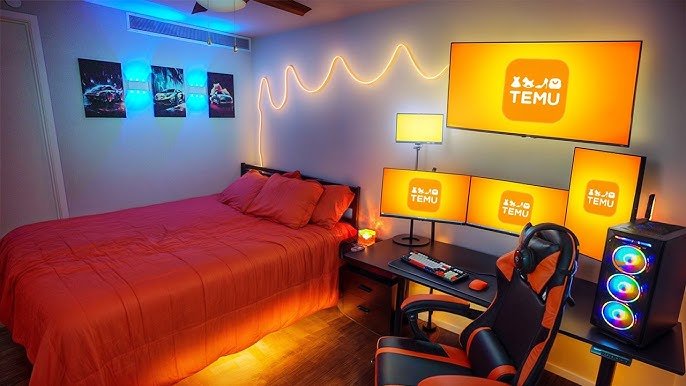
Bias lighting places a soft light behind your TV screen. This reduces eye fatigue by balancing the bright screen and dark room.
| Type of Bias Lighting | Benefit |
| LED Light Strips | Easy to install and color change options |
| Wall-mounted Lamps | Creates a warm glow behind the TV |
| Smart Bias Lights | Sync with TV colors for dynamic effects |
Decorative Accent Lights
Accent lights add personality and style to your bedroom. Use them to highlight art, shelves, or corners near your TV.
Fairy Lights
Soft and cozy lighting that drapes nicely.
Table Lamps
Provide focused light and decorative touch.
Wall Sconces
Offer indirect light and add elegance.

Credit: www.reddit.com
Cable Management Tips
Setting up a TV in your bedroom can make it cozy and fun. Managing cables keeps the space tidy and safe.
Explore these tips to hide cables, use organizers, and go wireless for a neat setup.
Hiding Wires And Cables
Cables can look messy if not hidden properly. To keep your bedroom looking clean, hide wires behind furniture or walls.
- Use cable raceways to cover wires on walls.
- Run cables along baseboards to keep them out of sight.
- Hide cables inside wall cavities for a seamless look.
Using Cable Organizers
Cable organizers help keep cords neat and untangled. Choose organizers that fit your space and needs.
Consider these options:
- Cable clips to keep cables attached to furniture.
- Zip ties for bundling multiple cables together.
- Cable boxes to store power strips and excess cords.
Wireless Connections
Going wireless reduces the number of cables needed. This makes your setup look cleaner and more organized.
| Device | Wireless Option |
| TV | Wi-Fi streaming |
| Speakers | Bluetooth connection |
| Game Console | Wireless controllers |
Decor And Personal Touches
Creating a cozy bedroom TV setup adds comfort and style. Focus on decor and personal touches to make the space uniquely yours.
With a few simple changes, your bedroom can transform into a perfect TV-watching haven.
Choosing A Theme
Selecting a theme sets the mood for your bedroom. Whether it’s modern, rustic, or minimalist, your theme will guide decor choices.
| Theme | Key Features |
| Modern | Sleek lines, neutral colors |
| Rustic | Wood textures, earth tones |
| Minimalist | Clutter-free, simple design |
Incorporating Art And Accessories
Art and accessories add character to your space. Choose pieces that reflect your personality and interests.
- Hang framed prints or paintings
- Add decorative pillows to the bed
- Place a stylish rug underfoot
Keeping The Space Clutter-free
A tidy space helps create a relaxing atmosphere. Use smart storage solutions to keep clutter at bay.
Tech Integration
Setting up a bedroom TV with the right technology improves your viewing experience. It also makes your space more functional and enjoyable.
Integrating streaming devices, voice controls, and power solutions creates a smooth and neat setup. This guide covers key tech elements to consider.
Streaming Devices And Consoles
Choose streaming devices that fit your entertainment needs. Consoles add gaming options and extra media features.
- Smart TV sticks for easy streaming
- Game consoles for play and apps
- Media players with high resolution support
- Compact devices to save space
Voice Control And Automation
Voice assistants help you control your TV hands-free. Automation makes your bedroom smarter and more comfortable.
| Feature | Benefit |
| Voice Commands | Control TV and devices easily |
| Smart Lights | Adjust lighting with voice or app |
| Automated Routines | Set schedules for devices and lights |
Charging Stations And Power Solutions
Keep devices charged and cables tidy with smart power setups. This avoids clutter and power issues.
- Use multi-port USB chargers for phones and tablets
- Place charging stations near the TV or bedside
- Install surge protectors to protect devices
- Hide cables with cable organizers or covers
Frequently Asked Questions
What Is The Best Tv Size For A Bedroom Setup?
The ideal TV size depends on your bedroom size and viewing distance. Generally, 32 to 50 inches suits most bedrooms. Measure the distance between your bed and TV, then choose a screen size that offers clear viewing without strain.
How To Mount A Tv In A Bedroom Safely?
Use a sturdy wall mount designed for your TV size and weight. Find studs in the wall to secure the mount properly. Follow manufacturer instructions carefully and ensure cables are organized to prevent accidents and maintain a clean setup.
Which Tv Features Are Important For Bedroom Viewing?
Look for a TV with good resolution, like 4K, for clear images. A TV with built-in speakers and adjustable brightness is ideal. Smart TV features allow easy streaming of shows and movies from your bed.
How To Optimize Bedroom Tv Sound Quality?
Place the TV away from walls to reduce sound reflection. Use a soundbar or external speakers for enhanced audio. Adjust TV audio settings to balance bass and treble for better clarity in a small room.
Conclusion
Creating a bedroom TV setup can make your space more relaxing. Choose the right size and position for comfort. Keep cables neat to avoid clutter and hazards. Use lighting that reduces glare on the screen. Add simple shelves or stands to organize devices.
A good setup helps you enjoy shows and movies better. Make small changes step by step for the best results. Your bedroom can become a cozy spot to unwind with TV time.