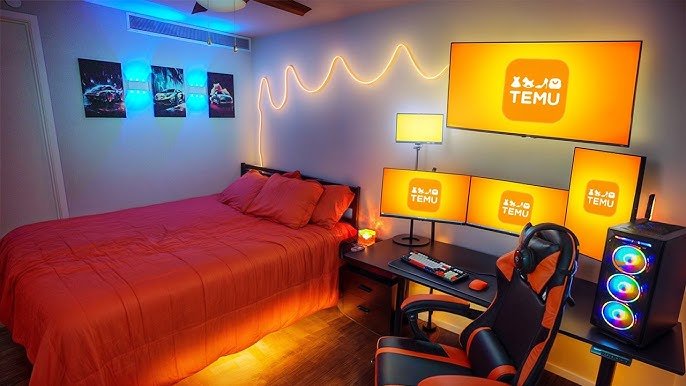
Are you ready to transform your bedroom into the ultimate gaming haven? Imagine a space where comfort meets cutting-edge tech, designed just for your gaming style.
Whether you want a cozy corner or a full-on gaming command center, the right setup can boost your focus and make every game more exciting. You’ll discover easy and creative bedroom ideas with gaming setups that fit your space and budget.
Get ready to level up your room and your gaming experience!
Choosing The Right Space
Selecting the right space is key for a bedroom with a gaming setup. The area must fit your gaming gear and allow comfortable movement.
The space should support good lighting and minimal distractions. This helps you enjoy gaming and rest well.
Assessing Room Size And Layout
Check the room’s size to fit your gaming desk, chair, and accessories. Leave space to move freely around the setup.
Think about the room’s layout. A simple layout helps place your gaming setup in the best spot. Avoid tight corners or crowded spaces.
- Measure room dimensions before buying furniture
- Choose a layout that keeps cables neat and safe
- Plan space for extra gear like consoles or speakers
Natural Lighting And Window Placement
Natural light makes the room feel fresh but can cause screen glare. Check where windows are located in the room.
Place your gaming desk so sunlight does not hit your screen directly. Use curtains or blinds to control brightness.
- Avoid facing windows directly to reduce glare
- Use window treatments to adjust light levels
- Consider desk placement near windows for natural light without reflection
Essential Gaming Furniture
Setting up a bedroom with gaming furniture can improve comfort and play time. The right furniture keeps everything organized and easy to use.
Good furniture helps create a space that fits your gaming gear and style. It also supports long hours of gaming without strain.
Ergonomic Chairs For Long Sessions
An ergonomic chair supports your back and neck during long gaming sessions. It helps reduce pain and keeps you comfortable.
- Look for chairs with adjustable height and armrests
- Choose models with lumbar support
- Pick breathable materials to keep cool
- Consider chairs with a reclining feature for breaks
Desks Designed For Gaming Gear
Gaming desks need space for multiple screens, keyboards, and other gear. They should be sturdy and have cable management options.
| Feature | Why It Matters |
| Large surface area | Holds all gaming devices comfortably |
| Sturdy build | Supports heavy equipment without wobbling |
| Cable management | Keeps wires neat and out of the way |
| Height adjustable | Allows for sitting or standing play |
Storage Solutions For Accessories
Good storage keeps controllers, headphones, and games organized. It also protects your gear from dust and damage.
Consider these storage ideas:
- Wall-mounted shelves to save floor space
- Drawers under the desk for small items
- Dedicated racks for game discs and controllers
- Hooks for headphones and cables
Optimizing Tech Setup
A good gaming setup in your bedroom needs careful planning. Optimizing your tech setup helps you play comfortably.
Focus on screen placement, cable management, and sound quality. These details make a big difference.
Monitor And Screen Arrangements
Place your monitor at eye level to reduce neck strain. Use a single large screen or multiple monitors for more space.
Keep a clean desk by mounting screens on the wall or using adjustable arms. This saves space and improves viewing angles.
- Center the main monitor directly in front of you
- Use dual screens for multitasking or expanded views
- Adjust brightness and contrast for comfort
- Consider curved screens for immersive experience
Cable Management Tips
Organize cables to keep your gaming area tidy. Use clips, sleeves, or cable trays to bundle wires together.
Label cables to find devices quickly. Avoid tangled cords to prevent damage and make cleaning easier.
- Use Velcro straps for flexible bundling
- Route cables behind desks or along walls
- Keep power cables separate from data cables
- Use cable boxes to hide power strips
Sound Systems And Acoustic Setup
Good sound boosts gaming immersion. Choose speakers or headphones based on your space and budget.
Reduce echo and noise with soft materials. Add rugs, curtains, or foam panels to improve room acoustics.
- Place speakers at ear level for clear sound
- Use surround sound for better game audio
- Choose noise-canceling headphones for focused play
- Soften hard surfaces to reduce sound reflection

Credit: www.lemon8-app.com
Comfort Features
A comfortable bedroom with a gaming setup makes gaming sessions more enjoyable. Consider the features that can enhance your comfort.
From the right bed to proper lighting, each element plays a vital role in creating a cozy gaming space.
Choosing The Perfect Bed
The bed is the focal point of your bedroom. It should support long hours of gaming and relaxation.
- Select a mattress that offers firm yet comfortable support.
- Consider adjustable beds for personalized comfort settings.
- Invest in quality pillows to prevent neck strain.
Lighting For Ambiance And Focus
Proper lighting enhances mood and concentration during gaming. It’s important to balance ambient and task lighting.
Custom ambient lighting, like LED strips, adds a gaming vibe.
Task lighting, such as desk lamps, ensures clarity during intense gaming moments.
Temperature And Airflow Control
Maintaining a cool temperature is essential for prolonged gaming sessions. Proper airflow keeps the room fresh.
| Feature | Benefit |
| Ceiling Fan | Improves air circulation |
| Portable AC | Maintains a cool temperature |
| Air Purifier | Keeps air clean |
Decor And Style Elements
Creating a bedroom with a gaming setup needs careful design. You want a space that feels cool and comfy.
Decor and style make your gaming area personal and fun. This guide helps you choose the right elements.
Color Schemes For A Gaming Vibe
Colors set the mood in your gaming bedroom. Dark colors make the space feel cozy and focused.
Bright neon colors add energy and excitement. Use a mix of dark and bright colors for balance.
- Black and dark gray for a sleek look
- Blue and purple for a calm, cool vibe
- Neon green or red for pop and energy
- Accent walls with LED light strips
Wall Art And Themed Decorations
Wall art can bring your favorite games to life. Posters or framed prints work well to show your style.
Themed decorations add fun details. Think about game logos, characters, or pixel art on shelves and walls.
- Hang posters of favorite game titles
- Use LED signs with game symbols
- Add shelves with collectibles or figures
- Place decals that match your gaming theme
Incorporating Personal Touches
Personal touches make your gaming space unique. Add items that show who you are outside gaming.
Use cozy pillows, blankets, or a custom mouse pad. These small details make the room feel inviting.
- Display photos or artwork you love
- Choose furniture that fits your style
- Add plants for a fresh look
- Use storage for neatness and ease
Credit: ugami.medium.com
Smart Home Integration
Creating a bedroom with a gaming setup can be exciting. Smart home integration makes it even better. You can control devices with your voice or automate your lighting.
Smart technology enhances your gaming experience. It offers convenience and efficiency. Let’s explore how to integrate smart devices into your gaming bedroom.
Voice-controlled Devices
Voice-controlled devices are easy to use. They let you manage your setup without moving. You can adjust your gaming environment with simple voice commands.
Devices like smart speakers and virtual assistants help you. They can play music or search for gaming tips. You can even control your room temperature.
- Control your gaming lights
- Set reminders for gaming sessions
- Adjust room temperature with voice
Automated Lighting And Shades
Automated lighting improves your gaming experience. You can create the perfect gaming atmosphere. Set lights to change colors or brightness automatically.
Smart shades adjust with a touch of a button. They provide comfort and privacy. You can schedule them to open or close at specific times.
| Smart Lighting Options | Benefits |
| Color-changing bulbs | Set mood for different games |
| Dimmer switches | Adjust brightness easily |
| Automated shades | Control natural light |
Maintaining Balance
Creating a bedroom with a gaming setup needs balance. You want space for fun and rest.
Good design helps you separate gaming and sleeping areas. This keeps your room calm and organized.
Separating Gaming And Sleeping Zones
Set clear borders between your gaming spot and your bed. This helps your brain switch between work and rest.
- Place your gaming desk away from the bed
- Use rugs or screens to mark gaming space
- Keep gaming accessories in one area
- Choose lighting that suits each zone
- Use different wall colors or decorations for each space
Creating A Relaxing Environment
Make your sleeping zone calm and quiet. Remove bright lights and noisy devices.
| Tip | Reason |
| Use blackout curtains | Blocks light for better sleep |
| Choose soft bedding | Increases comfort and rest |
| Add plants | Improves air quality and calm |
| Keep devices out of bed area | Reduces distractions and noise |

Credit: www.lorddecor.com
Frequently Asked Questions
What Are The Best Gaming Setups For Small Bedrooms?
Compact desks with wall-mounted monitors save space. Use vertical storage and multi-functional furniture to maximize room. Choose ergonomic chairs to maintain comfort in tight spaces. Good lighting enhances the gaming experience without cluttering the room.
How To Design A Gaming Bedroom For Comfort?
Focus on ergonomic furniture like adjustable chairs and desks. Use soft lighting to reduce eye strain. Add soundproofing or noise-canceling headphones for quiet. Keep the room organized to avoid distractions. Include cozy elements like cushions and blankets for relaxation.
Which Gaming Accessories Improve Bedroom Aesthetics?
RGB LED lights add vibrant ambiance and mood settings. Cable management tools keep wires tidy and hidden. Sleek gaming desks and chairs enhance style. Custom wall art or themed decor personalizes the space. Floating shelves display collectibles without crowding.
How To Optimize Gaming Setup Lighting In Bedrooms?
Use adjustable LED lights to control brightness and color. Avoid harsh overhead lighting to prevent glare. Add bias lighting behind monitors to reduce eye strain. Consider smart bulbs for customizable settings. Natural light is great but manage with blackout curtains.
Conclusion
Creating a bedroom with a gaming setup can be fun and practical. Choose a comfortable chair and desk to support long gaming hours. Add good lighting to reduce eye strain and improve focus. Organize cables and devices to keep the space tidy.
Personalize the room with colors and decorations you love. This way, you build a cozy and efficient gaming space. Enjoy your games and relax in your own perfect room. Simple changes can make a big difference. Start with small steps and see what works best for you.