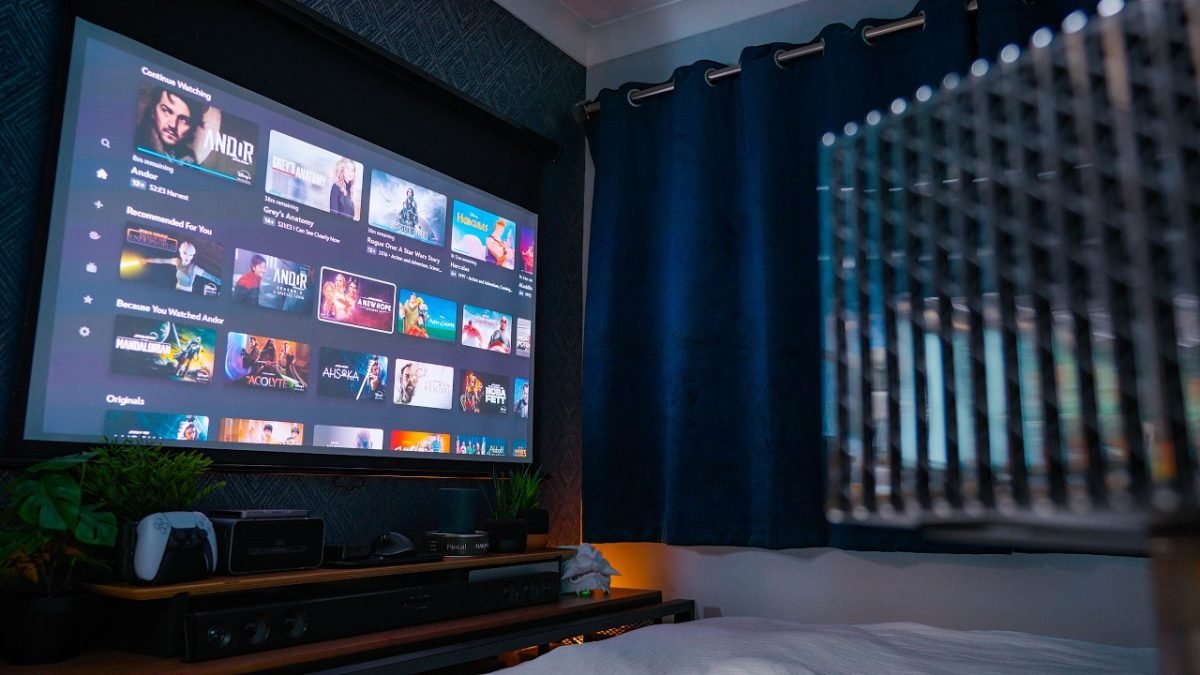
Imagine turning your bedroom into a cozy personal theater where you can watch movies, play games, or stream your favorite shows on a big screen. Setting up a projector in your bedroom can make this dream a reality, but it’s not as simple as just plugging it in.
You need the right setup to get the best picture, sound, and overall experience without clutter or hassle. You’ll discover easy, practical tips to create the perfect projector setup in your bedroom. By the end, you’ll know exactly how to transform your space into an entertainment haven that feels just right for you.
Ready to elevate your bedroom entertainment? Let’s dive in!

Credit: www.reddit.com
Choosing The Right Projector
Setting up a projector in your bedroom can create a cozy and personal cinema. Picking the right projector makes a big difference in your viewing experience.
This guide helps you understand key features to look for when choosing a projector for your bedroom.
Types Of Projectors
There are several types of projectors to consider. Each has different features and price points.
- DLP Projectors:Use tiny mirrors to create sharp images. They are compact and often affordable.
- LCD Projectors:Use liquid crystal displays for bright and clear pictures. They are good for colorful content.
- LED Projectors:Use LED lights that last longer and consume less power. They are usually smaller and quieter.
- LCoS Projectors:Combine LCD and DLP features. They offer high resolution but can be costly.
Resolution And Brightness
Resolution affects image clarity. Brightness helps you see the picture well, even with some light in the room.
| Resolution | Best For |
| 720p (HD) | Basic movies and TV shows |
| 1080p (Full HD) | Most bedroom setups, clear picture |
| 4K (Ultra HD) | High-end viewing, very sharp images |
| Brightness (Lumens) | Needs at least 1500 lumens for dim rooms |
Throw Distance And Lens Shift
Throw distance is how far the projector must be from the screen. Lens shift allows you to move the image without moving the projector.
- Measure your bedroom size before buying.
- Short throw projectors work well in small rooms.
- Lens shift helps adjust the image up, down, left, or right.
- Check if the projector supports zoom to fit your screen size.
Sound Options
Some projectors include built-in speakers, but sound quality may be limited. External speakers can improve audio experience.
- Use Bluetooth speakers for wireless sound.
- Connect a soundbar for better bass and volume.
- Check if the projector has audio output ports.
Selecting The Perfect Screen
Choosing the right screen is key for a great bedroom projector setup. The screen affects picture quality and viewing comfort.
Think about your room size, projector type, and how you want to use the screen before buying one.
Screen Types And Materials
There are different screen types like fixed and retractable. The material also changes how the image looks.
Common materials include matte white, glass bead, and grey screens. Each offers different brightness and color effects.
- Matte White:Good for most lighting conditions and wide viewing angles.
- Glass Bead:Reflects light better but has narrow viewing angles.
- Grey Screen:Enhances contrast in bright rooms.
Fixed Vs. Retractable Screens
Fixed screens stay in one place and offer a smooth surface. They are best for permanent setups.
Retractable screens can be rolled up when not in use. They save space and keep the room tidy.
- Fixed Screens:Always ready to use, no wrinkles.
- Retractable Screens:Space-saving and easy to hide.
Screen Size And Aspect Ratio
Pick a screen size that fits your bedroom space and viewing distance. Too big or small can hurt the experience.
Aspect ratio is the width to height ratio of the screen. Common ratios are 16:9 and 4:3.
- 16:9:Standard for movies and TV shows.
- 4:3:Used for older content and presentations.
Optimizing Bedroom Layout
Setting up a projector in your bedroom can create a cozy movie space. Planning the layout helps you get the best viewing experience.
Think about where to place the projector, how to arrange seating, and how to control lighting for clear images.
Ideal Projector Placement
Place the projector where it can shine directly on a blank wall or screen. Avoid walls with windows or decorations.
Make sure the projector is far enough to fill the screen but not too close to blur the image. Use a shelf or mount it on the ceiling.
- Keep projector lens clean for a sharp picture
- Check projector throw distance for your room size
- Place projector where cables are easy to connect
Seating Arrangements
Arrange seating so everyone can see the screen clearly. Use a bed, chairs, or a small sofa facing the projector wall.
Keep seats at a good distance from the screen. Add cushions or bean bags for flexible seating options.
- Place seats at eye level with the screen center
- Leave enough space to move around comfortably
- Use soft seating for comfort during long viewing
Lighting Control
Control bedroom lighting to reduce glare and improve image quality. Use blackout curtains to block outside light.
Install dimmable lights or lamps to adjust brightness. Turn off or cover bright lights near the screen.
- Use thick curtains to block daylight
- Install dimmable or smart lighting
- Avoid placing lights behind the projector screen
Wiring And Connectivity
Setting up a projector in your bedroom needs careful wiring and connectivity. Proper connections ensure clear images and sound. Planning helps avoid tangled cables and interruptions.
This guide covers cable management tips, wireless options, and audio system integration. Each section offers simple ways to keep your setup neat and efficient.
Cable Management Tips
Good cable management keeps your bedroom tidy and prevents damage to wires. It also makes it easier to fix or add devices later.
- Use cable clips or ties to bundle wires together.
- Label each cable for easy identification.
- Run cables along walls or under carpets to hide them.
- Choose flat HDMI or power cables for easier concealment.
- Keep power cords separate from signal cables to reduce interference.
Wireless Options
Wireless connections reduce cable clutter. They allow flexible placement of your projector and devices.
| Wireless Type | Use Case | Pros | Cons |
| Wi-Fi | Stream videos from phone or PC | No cables, good range | May lag if signal weak |
| Bluetooth | Connect audio devices like speakers | Low power, easy setup | Shorter range, lower quality |
| Wireless HDMI | Mirror video from laptop | High quality video | More expensive, needs power |
Integrating With Audio Systems
Linking your projector to audio systems improves sound quality. You can choose wired or wireless methods.
Here are common audio connection types:
- HDMI ARC:Sends audio and video through one cable.
- Optical Cable:Provides clear digital sound.
- 3.5mm Jack:Simple analog connection for speakers.
- Bluetooth:Wireless sound with easy pairing.
Enhancing Picture Quality
Setting up a projector in your bedroom can create a great viewing experience. Improving the picture quality makes watching movies more enjoyable.
Small changes in your setup can make images clearer and colors brighter. Good picture quality depends on several factors you can control.
Calibration Basics
Calibrating your projector means adjusting settings to get the best image. You should check brightness, contrast, and color balance.
Use test patterns or calibration tools to fine-tune your picture. This helps the image look natural and clear on your bedroom wall.
- Adjust brightness to avoid dark or washed-out images
- Set contrast for sharp differences between light and dark areas
- Balance colors for realistic skin tones and scenes
- Focus the lens for sharpness
Reducing Ambient Light
Ambient light can wash out your projector’s picture. Lower the light in your bedroom to see better colors and details.
Close curtains and turn off bright lights. Use soft lamps or indirect lighting for comfort without hurting the image.
- Use blackout curtains or blinds
- Turn off overhead lights during viewing
- Place the projector away from windows
- Use dimmable lamps if needed
Using Ambient Light Rejecting Screens
Ambient light rejecting (ALR) screens improve picture quality by blocking extra light. They help keep the image clear in bright rooms.
These screens reflect projector light back to you while reducing light from other sources. This makes colors pop and blacks deeper.
- Choose a screen designed for your projector type
- Place the screen away from direct light
- Clean the screen to keep it clear
- Match screen size to your room and projector

Credit: www.tataneu.com
Creating A Comfortable Viewing Experience
Setting up a projector in your bedroom can be exciting. It can make movie nights special. The right setup ensures comfort and enjoyment.
Focus on soundproofing, seating, and acoustics. Each part plays a big role in your experience.
Soundproofing Techniques
Soundproofing keeps noise inside your room. It stops outside noise from coming in. This helps make the movie sound clear.
- Use heavy curtains to block sound.
- Add rugs to absorb noise.
- Install weather stripping on doors.
Comfortable Seating Choices
Seating is key for comfort during long movies. Choose seating that supports your back.
Think about bean bags or recliners. They can be cozy and adjustable.
- Bean bags are flexible and soft.
- Recliners offer adjustable support.
- Floor cushions are budget-friendly.
Room Acoustics
Good acoustics make sound clear and rich. Consider the shape and materials in your room.
Soft surfaces like carpets help absorb sound. Hard surfaces reflect it.
- Place speakers at ear level.
- Use wall panels to control sound.
- Position furniture to enhance sound flow.
Maintenance And Troubleshooting
Setting up a projector in your bedroom can be exciting. But, it requires regular maintenance to function well.
Addressing minor issues promptly prevents bigger problems. Let’s explore how to care for your projector and resolve common issues.
Cleaning And Care
Regular cleaning ensures your projector delivers clear images. Dust buildup can reduce brightness.
- Turn off the projector and unplug it before cleaning.
- Use a soft cloth to wipe the exterior.
- Clean the lens with a lens brush or specialized cloth.
- Check air filters monthly and clean or replace them as needed.
Common Issues And Fixes
Sometimes projectors face issues like overheating or poor image quality. These are common and often easy to fix.
| Issue | Solution |
| Overheating | Ensure proper ventilation; check for blocked vents. |
| Blurry Image | Adjust the focus ring or clean the lens. |
| No Signal | Check cable connections and input settings. |
Upgrading Components
Upgrading parts can enhance your projector’s performance. Consider these options for better viewing experiences.
- Upgrade the lamp if brightness fades over time.
- Consider a new screen for sharper images.
- Enhance sound quality with external speakers.
- Use high-quality cables for improved signal transmission.

Credit: www.reddit.com
Frequently Asked Questions
How Do I Position A Projector In A Bedroom?
Place the projector opposite your screen or wall. Ensure a clear line of sight and avoid obstacles. Measure distance for optimal image size and focus. Adjust height using a ceiling mount or stable surface. Proper positioning enhances viewing comfort and image quality.
What Screen Size Suits A Bedroom Projector Setup?
Choose a screen size that fits your bedroom space. Generally, 80 to 120 inches diagonal is ideal. Consider viewing distance; 1. 5 to 2. 5 times the screen width is best. A smaller screen avoids overwhelming the room and maintains image clarity.
How To Control Ambient Light In A Bedroom Projector Setup?
Use blackout curtains or blinds to block external light. Turn off or dim room lights during viewing. Choose a projector with high lumens for brighter images. Controlling ambient light improves contrast and overall picture quality.
What Is The Best Projector Type For Bedrooms?
Choose a compact, quiet projector with good brightness. LED or laser projectors work well for bedrooms. Look for models with low fan noise and energy efficiency. These features ensure a pleasant viewing experience without disturbing sleep.
Conclusion
Setting up a projector in your bedroom can create a cozy movie space. Choose the right spot for clear, bright images. Keep cables neat and out of the way. Adjust the screen size to fit your wall well. Use soft lighting to avoid glare on the screen.
Test sound options for the best audio experience. A simple setup makes watching more enjoyable every night. Try different arrangements until it feels just right. Enjoy your new bedroom theater with friends or alone. It’s easy and fun to make your space special.