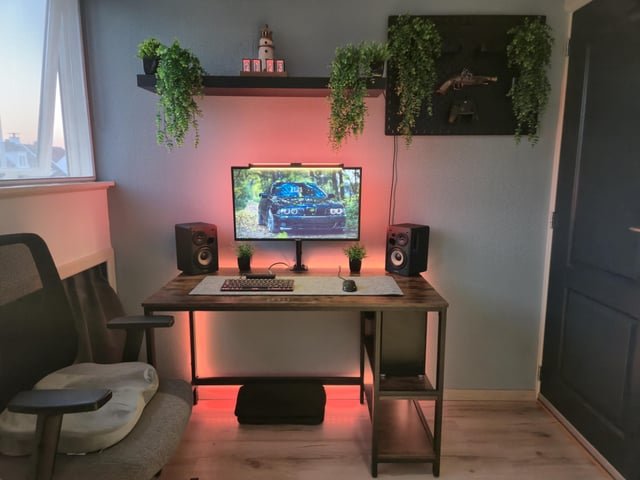
Your bedroom is more than just a place to sleep—it can be the ultimate spot for your PC setup. Imagine having a space where comfort meets productivity, where every gadget and accessory is perfectly placed just for you.
Whether you’re gaming, working, or streaming, the right PC bedroom setup can change the way you experience your daily tasks. Ready to transform your room into a powerful, personal workstation? Keep reading to discover easy tips and smart ideas that will make your setup both stylish and functional.
Choosing The Right Desk
A good desk is key for your PC bedroom setup. It holds your computer and other gear. Picking the right desk helps keep your space neat and comfy.
Think about what you need before buying a desk. Size, material, and comfort all matter. This guide will help you choose well.
Size And Shape Options
Your desk size should fit your room and gear. Shapes like rectangular, L-shaped, or corner desks offer different space uses.
- Rectangular desks work well in small rooms.
- L-shaped desks give more surface area and fit corners.
- Corner desks use space efficiently in tight areas.
- Make sure the desk height matches your chair for comfort.
Material And Durability
Desk materials affect how long it lasts and how it looks. Choose one that fits your style and budget.
| Material | Durability | Appearance | Cost |
| Wood | High | Warm and classic | Medium to high |
| Metal | Very high | Modern and sleek | Medium |
| Glass | Medium | Elegant but fragile | High |
| Particleboard | Low to medium | Varies with finish | Low |
Ergonomics And Comfort
Comfort is key for long PC use. The desk should support good posture and reduce strain.
- Choose desks with adjustable height if possible.
- Look for enough space for your legs and feet.
- Rounded edges help avoid discomfort on arms.
- Keep monitor at eye level to protect your neck.
Selecting A Comfortable Chair
Choosing the right chair for your PC bedroom setup helps you stay comfortable. A good chair supports your back and lets you sit longer without pain.
This guide covers key points to consider when picking a chair. Focus on ergonomics, style, and budget to find the best fit.
Ergonomic Features
An ergonomic chair keeps your body in a healthy posture. Look for adjustable height and lumbar support. These features reduce strain on your back and neck.
- Adjustable seat height to keep feet flat on the floor
- Lumbar support to maintain the natural curve of the spine
- Swivel base for easy movement
- Armrests that can be adjusted to reduce shoulder tension
- Breathable fabric to keep you cool
Style And Aesthetics
Your chair should match the look of your bedroom and desk. Choose colors and materials that blend well with your setup. A stylish chair makes your room look neat and inviting.
| Style | Material | Best For |
| Modern | Mesh | Good airflow and minimal design |
| Classic | Leather | Elegant look and durability |
| Casual | Fabric | Comfort and variety of colors |
Budget-friendly Choices
You can find comfortable chairs that do not cost too much. Look for deals and simple designs that still offer good support. Avoid very cheap chairs without any ergonomic features.
Budget tips:
- Check online reviews before buying
- Buy during sales or discount periods
- Consider secondhand chairs in good condition
- Focus on key features like adjustable height and lumbar support
Optimizing Pc Placement
Setting up your PC in a bedroom needs careful planning. Proper placement improves comfort and usability.
This guide helps you place your PC for better work and leisure time.
Monitor Positioning Tips
Place your monitor at eye level to reduce neck strain. Keep the screen about an arm’s length away.
- Center the monitor in front of your chair
- Adjust height so the top of the screen aligns with your eyes
- Use a monitor stand if needed
- Reduce glare by avoiding direct light on the screen
Cable Management Solutions
Organized cables keep your PC area tidy and safe. It also makes cleaning easier.
| Tip | Benefit |
|---|---|
| Use cable ties or Velcro straps | Keeps cables bundled and neat |
| Label cables near plugs | Saves time when unplugging devices |
| Run cables along desk edges | Prevents tripping and clutter |
| Use a cable box or sleeve | Hides cables and protects from dust |
Cooling And Ventilation
Good airflow prevents your PC from overheating. Keep vents clear and avoid tight spaces.
- Place the PC tower on a flat, hard surface
- Leave at least 4 inches of space around vents
- Use a small fan if the room feels warm
- Keep the area dust-free by cleaning regularly
Lighting For Function And Mood
Lighting is very important for your PC bedroom setup. It helps you work well and feel comfortable.
Good lighting shows your style and makes your space more enjoyable.
Natural Light Utilization
Use windows to bring in natural light during the day. It saves energy and makes the room bright.
Place your desk near a window but avoid screen glare. Use light curtains to soften sunlight.
- Keep windows clean for maximum light
- Use sheer curtains to reduce harsh light
- Arrange furniture to get daylight on your workspace
Task Lighting Ideas
Task lighting helps you see clearly while working or gaming. It reduces eye strain.
Use adjustable desk lamps with bright but soft light. Position lights to avoid screen reflections.
- LED desk lamps save energy and last long
- Clamp lamps free up desk space
- Use warm white bulbs for a calm look
Ambient And Accent Lighting
Ambient light fills the whole room with soft light. It sets a relaxed mood for your space.
Accent lights highlight decorations or shelves. They add style and depth to your setup.
- Use LED strips behind monitors or desks
- Choose dimmable ceiling lights for control
- Add small lamps or fairy lights for accents
Storage And Organization
Setting up your PC bedroom space well helps keep things neat. Good storage and organization make the area more comfortable.
Using the right tools and furniture keeps your desk and room tidy. It also saves time when you need to find things fast.
Desk Accessories
Desk accessories help keep small items like pens and cables in order. They stop your desk from looking messy and crowded.
- Use pen holders to store writing tools.
- Get a cable organizer to keep wires untangled.
- Use small trays for paper clips and USB drives.
- Add a desk mat to protect the surface and reduce noise.
Shelving And Drawers
Shelves and drawers provide space for books, games, and other items. They keep things off your desk and floor.
| Storage Type | Best Use | Tip |
| Wall Shelves | Books and decor | Install at eye level |
| Under-Desk Drawers | Documents and gadgets | Choose smooth gliding drawers |
| Stackable Boxes | Extra cables and parts | Label each box clearly |
Keeping Clutter At Bay
Regular cleaning helps keep clutter from building up. A clear desk makes it easier to focus on work or play.
Try this simple routine:
- Put away items after use.
- Sort papers weekly.
- Throw out what you don’t need.
- Keep only daily essentials on your desk.

Credit: www.youtube.com
Decorating Your Space
Creating a PC bedroom setup is fun and creative. Your space should reflect your style and be cozy.
Decorating involves choosing the right colors, art, and personal items. This makes your space unique.
Color Schemes And Themes
Colors set the mood for your room. Choose a scheme that you love.
Matching colors can create harmony. Think about what makes you feel relaxed.
- Blue and white for a calm feel
- Black and red for a bold look
- Pastels for a soft atmosphere
Wall Art And Posters
Wall art adds personality. Choose pieces that inspire or excite you.
Posters of favorite games or movies can be great. They tell a story about who you are.
- Frame art prints for a classy touch
- Use posters for a youthful vibe
- Try wall decals for something different
Plants And Personal Touches
Plants bring life into your room. They also help clean the air.
Add personal items to make your room special. These could be gifts or souvenirs.
- Small succulents for easy care
- Photos of family and friends
- Unique gadgets or collectibles
Sound And Acoustics
Setting up your PC bedroom involves more than just technology. Sound and acoustics play a key role. They affect your comfort and focus.
Good sound can enhance your gaming and work experience. Managing acoustics can reduce unwanted noise and improve clarity.
Noise Reduction Tips
Reducing noise in your bedroom setup is important. It helps in creating a peaceful environment.
- Use thick curtains to block outside noise.
- Place soft furniture to absorb sound.
- Keep windows and doors closed during work.
Speakers And Headphones
Choosing the right speakers and headphones is crucial. They determine the quality of your audio experience.
Headphones are great for personal use. Speakers can fill the room with sound.
- Use noise-canceling headphones for focused work.
- Select speakers with good bass for gaming.
- Consider wireless options for flexibility.
Acoustic Panels And Rugs
Acoustic panels and rugs can improve sound quality. They help in reducing echoes and noise.
Panels can be placed on walls. Rugs cover the floor and absorb sound.
- Install panels where sound bounces the most.
- Choose thick rugs for better sound absorption.
- Arrange furniture to minimize sound travel.

Credit: www.youtube.com
Tech Accessories And Upgrades
Upgrading your PC bedroom setup can improve comfort and productivity. The right tech accessories help you work and play better.
Small changes like better keyboards or webcams can make a big difference. Let’s explore some key accessories to consider.
Keyboards And Mice
Choosing the right keyboard and mouse is important for long hours at the desk. Comfort and precision are top priorities.
- Mechanical keyboards offer tactile feedback and durability.
- Wireless mice reduce cable clutter for a cleaner desk.
- Ergonomic designs help reduce hand strain.
- Backlit keyboards improve visibility in low light.
Webcams And Microphones
Good webcams and microphones improve your video calls and recordings. Clear audio and sharp video make communication easier.
| Accessory | Benefit | Tip |
| Webcam | Sharp video quality | Choose 1080p or higher |
| Microphone | Clear sound | Use noise-cancelling models |
| Headset | Combined audio and mic | Comfortable padding is key |
Charging Stations And Hubs
Charging stations and hubs help manage devices neatly. They keep your gadgets powered and organized.
Popular features to look for:
- Multiple USB ports for charging several devices
- Fast charging support for phones and tablets
- Compact design to save desk space
- Compatibility with laptops and accessories
Maintaining Your Setup
Keeping your PC bedroom setup clean and organized helps it work well. It also makes your space more comfortable to use every day.
Simple maintenance routines can extend the life of your equipment and keep your setup running smoothly.
Regular Cleaning Tips
Dust and dirt can build up quickly on your PC and accessories. Cleaning regularly prevents damage and overheating.
- Turn off and unplug your PC before cleaning.
- Use a soft cloth to wipe down surfaces.
- Clean the keyboard and mouse with disinfectant wipes.
- Use compressed air to remove dust from vents and fans.
- Keep drinks and food away from your setup.
Cable And Hardware Checks
Check cables and hardware often to avoid connection problems and wear. Good cable management keeps your desk tidy and safe.
| Check Point | What to Do | Frequency |
| Power Cables | Inspect for frays or damage | Monthly |
| USB and Audio Cables | Secure connections firmly | Weekly |
| Hardware Components | Ensure all parts are seated properly | Every 3 months |
| Cable Management | Organize with ties or clips | Monthly |
Upgrading Components
Upgrading parts can improve performance and keep your setup up to date. Plan upgrades based on your needs and budget.
Consider these points when upgrading:
- Check compatibility with existing parts.
- Prioritize upgrades for slow or outdated components.
- Keep your drivers and software updated after upgrades.
- Backup your data before installing new hardware.

Credit: www.reddit.com
Frequently Asked Questions
What Is The Ideal Pc Bedroom Setup Size?
The ideal PC bedroom setup fits comfortably without crowding. Measure your space and allow room for movement and ventilation. A compact desk with ergonomic chair suits most bedrooms, balancing functionality and comfort for long sessions.
How To Choose The Best Desk For Pc Bedroom Setup?
Select a desk that fits your space and supports your PC gear. Prioritize sturdy materials, cable management, and surface area for monitors and accessories. Adjustable height desks add ergonomic benefits and save space in small bedrooms.
Which Lighting Works Best For Pc Bedroom Setups?
Soft, adjustable lighting reduces eye strain and enhances focus. Use LED desk lamps or bias lighting behind monitors. Avoid harsh overhead lights and glare to maintain a comfortable gaming or work environment in your bedroom.
How To Organize Cables In A Pc Bedroom Setup?
Use cable clips, sleeves, or under-desk trays to keep cables tidy. Label cords for easy identification and avoid tangling. Proper cable management improves airflow and aesthetics in your bedroom setup.
Conclusion
Creating a PC bedroom setup can make your space both cozy and functional. Choose a desk and chair that fit well in your room. Keep cables neat for a clean look. Good lighting helps reduce eye strain. Personal touches make the setup feel yours.
A simple, organized space boosts focus and comfort. Small changes can make a big difference. Start with what you have, then improve over time. Enjoy your space and the work or play it supports.