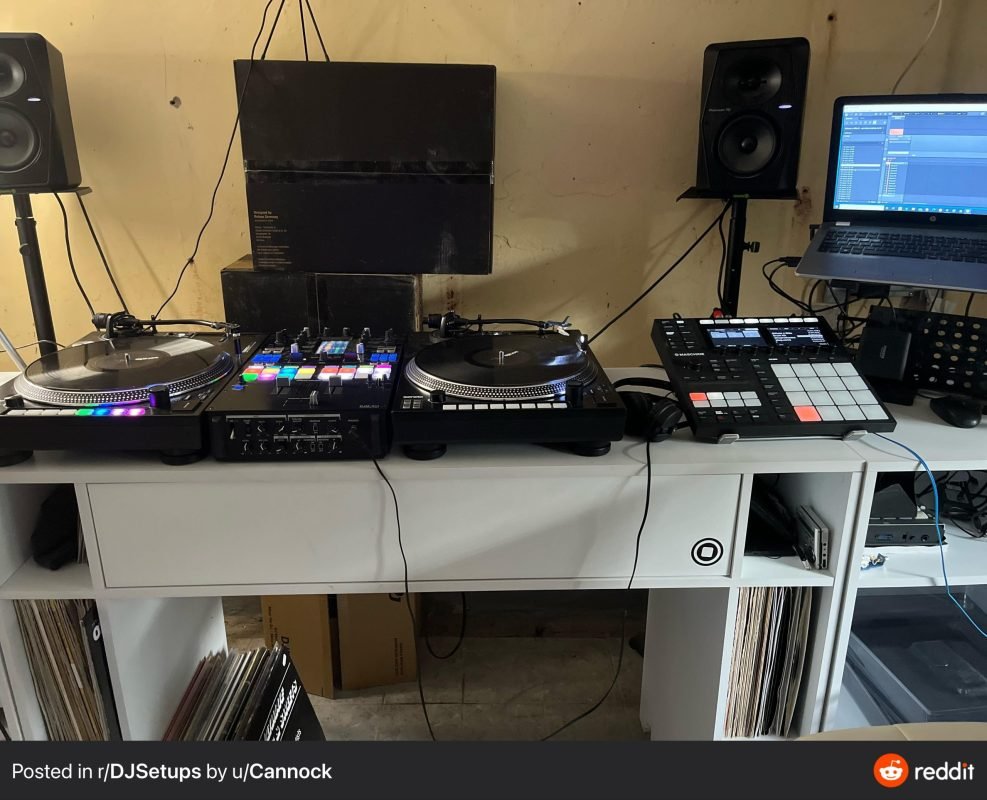
Are you ready to transform your bedroom into the ultimate DJ playground? Whether you’re just starting out or looking to upgrade your gear, setting up a bedroom DJ space that works for you can make all the difference.
Imagine having everything you need right at your fingertips, so you can mix, scratch, and create beats anytime inspiration strikes. In this guide, you’ll discover simple tips and tricks to build a setup that fits your style, budget, and space perfectly.
Keep reading to unlock the secrets to your perfect bedroom DJ setup and take your music skills to the next level.

Credit: thegigabrain.com
Choosing The Right Space
Picking the right space for your bedroom DJ setup is important. It helps you play music clearly and enjoy mixing.
The space should fit your gear and let you move freely. Think about how the room feels and sounds.
Room Size And Layout
Choose a room size that fits your DJ equipment comfortably. A small room can work if it has a good layout.
Make sure there is space for your mixer, speakers, and laptop. Arrange your gear so you can reach everything easily.
- Clear space around your setup helps with cables and movement
- Flat surfaces prevent equipment from falling or shaking
- Keep the setup away from doors and windows to avoid noise
Acoustic Considerations
Good sound is key in a DJ setup. Hard walls can cause echoes and distort your music.
Use soft materials like rugs, curtains, or foam to reduce sound reflections. This will improve the listening experience.
- Place speakers at ear level for better sound
- Avoid corners to reduce bass build-up
- Add soft furniture to absorb sound waves
Lighting And Ambiance
Lighting sets the mood in your DJ space. Use soft, adjustable lights to create a relaxed vibe.
Avoid harsh or flickering lights that can distract you. Colored lights or LEDs add style without being too bright.
- Use dimmable lamps for control over brightness
- Add LED strips for color effects
- Keep lighting away from screens to reduce glare

Credit: www.reddit.com
Essential Dj Gear
Setting up a bedroom DJ space needs the right gear. Good tools make mixing music easier and fun.
This guide covers the basic DJ gear you need to start playing music at home.
Dj Controllers And Mixers
DJ controllers combine many functions into one device. They help you control music software easily.
Mixers let you blend sounds from different sources. They are important for smooth transitions.
- Controllers often have built-in audio interfaces
- Mixers can connect turntables and CD players
- Both have volume faders and EQ controls
Turntables Vs Digital Setups
Turntables use vinyl records and give a classic DJ feel. They need more space and care.
Digital setups use software and controllers. They are easy to carry and offer many features.
- Turntables provide tactile control and analog sound
- Digital setups have more effects and track options
- Both can be used with mixers or standalone
Speakers And Headphones
Good speakers help you hear your mixes clearly. They should fit the size of your room.
Headphones allow you to listen to tracks before playing them out loud. Comfort is important.
- Choose speakers with clear sound and bass
- Use closed-back headphones for noise isolation
- Check volume levels to protect your ears
Computer And Software
Setting up a bedroom DJ station needs the right computer and software. These tools help you mix and play music smoothly.
Choosing the right laptop and software can improve your DJ experience. It also helps avoid technical problems during your sets.
Choosing A Dj Laptop
A good DJ laptop should be fast and reliable. It must handle music software without lag or crashes.
- Look for at least 8GB of RAM for smooth performance.
- Choose a laptop with a fast processor like Intel i5 or better.
- Get enough storage, preferably a solid-state drive (SSD).
- Check for multiple USB ports to connect DJ gear.
- Battery life should last through your practice sessions.
Popular Dj Software Options
Many DJ software programs help you mix tracks easily. They offer different features and suit various skill levels.
| Software | Key Features | Platform |
|---|---|---|
| Serato DJ | Simple interface, good for beginners and pros | Windows, Mac |
| Traktor Pro | Advanced effects, strong looping tools | Windows, Mac |
| Virtual DJ | Supports many formats, video mixing | Windows, Mac |
| Rekordbox | Great library management, hardware integration | Windows, Mac |
Optimizing Performance
Keep your laptop ready for DJing by optimizing its performance. This avoids interruptions and lag during mixes.
- Close all unused apps before DJing.
- Keep your software and drivers up to date.
- Use a cooling pad to prevent overheating.
- Disable power-saving modes for full performance.
- Regularly clean your laptop’s disk and files.

Credit: www.reddit.com
Sound Treatment And Acoustics
Setting up a bedroom DJ station needs good sound treatment. It helps to hear clear music. Acoustics make your mixes sound better.
Without treatment, sound can bounce around. This causes echoes and muddy audio. Treating your room fixes these problems.
Basic Acoustic Panels
Acoustic panels absorb sound waves. They reduce reflections and echoes. Place panels on walls where sound bounces most.
- Use foam or fabric-wrapped panels
- Put panels at ear level and first reflection points
- Cover side walls and behind speakers
- Keep some wall space clear for natural room sound
Bass Traps And Diffusers
Bass traps absorb low frequencies that build up in corners. Diffusers scatter sound to reduce harsh reflections. Both improve sound clarity.
| Type | Purpose | Placement |
| Bass Traps | Absorb low bass sounds | Room corners |
| Diffusers | Scatter mid and high frequencies | Back walls or ceiling |
Diy Soundproofing Tips
DIY soundproofing can help block noise. Use simple materials to reduce sound leakage and improve room quietness.
- Seal gaps around doors and windows with weatherstripping
- Hang heavy curtains over windows
- Use thick rugs or carpets on the floor
- Build simple acoustic panels with rock wool and fabric
- Place bookshelves or furniture against walls to add mass
Setting Up Your Studio
Creating a bedroom DJ setup is fun and rewarding. A good studio setup helps you work better and enjoy your music.
Organizing your space with care makes mixing easier and keeps your gear safe. Let’s look at some key tips.
Ergonomic Layout Tips
Arrange your equipment so you can reach everything without strain. Keep frequently used gear close.
Place your speakers at ear level and use a desk with enough space for your controller and laptop.
- Keep your back straight when sitting
- Use a chair with good support
- Set your screen at eye level
- Leave space for notes or headphones
Cable Management Strategies
Organize cables to avoid tangles and accidents. Label your cables to find them easily.
Use cable ties or clips to keep wires tidy. Keep power cables separate from audio cables to reduce noise.
- Group cables by function
- Use Velcro straps or twist ties
- Keep cables off the floor
- Check cables regularly for damage
Creating A Comfortable Workspace
Make your studio a place you enjoy spending time. Good lighting and air flow help you focus.
Add some personal touches like posters or plants. Keep snacks and water nearby to stay refreshed.
- Use soft, adjustable lighting
- Keep your room cool and ventilated
- Have a chair that feels good
- Organize your space to reduce clutter
Lighting And Visuals
Creating the right ambiance in your bedroom DJ setup is key. Lights and visuals make the experience immersive. They transform the room into a mini club.
Let’s explore ways to use lighting and visuals to enhance your DJ sessions. Mood lighting, visual effects, and syncing lights with music are essential.
Mood Lighting Ideas
Setting the mood with lighting can change the entire vibe. Consider different colors and brightness levels to suit various music genres. Warm lights create a relaxed setting.
- Use LED strip lights for flexible placement
- Adjust brightness with dimmable bulbs
- Choose colors that match the music’s mood
Integrating Visual Effects
Visual effects add another layer to your DJ setup. They capture attention and keep the energy high. Consider using projectors or screens to display visuals.
For a personalized touch, create custom visuals that move with the beat. This can be achieved with software like Resolume or VJing apps.
Syncing Lights With Music
Syncing lights with music creates a dynamic experience. It makes the music come alive and engages the audience. This requires some technical setup but is worth the effort.
| Equipment | Purpose |
| DMX Controller | Control light patterns |
| Sound Reactive Lights | Change with music beats |
| Software Plugins | Sync visuals and lights |
Budgeting Your Setup
Setting up a bedroom DJ space needs planning. Budgeting helps you buy what you need without overspending.
Start with a clear idea of your budget. This keeps your setup practical and fun.
Affordable Gear Choices
You can find good DJ gear without spending a lot. Focus on basics that work well together.
Look for compact controllers, simple headphones, and budget speakers. These items fit small spaces and cost less.
- Entry-level DJ controllers with built-in sound cards
- Closed-back headphones for noise isolation
- Compact powered speakers for clear sound
- Basic DJ software that comes free or low cost
Where To Save And Splurge
Save money on gear you can upgrade later. Spend more on key items that affect sound quality.
Spend more on speakers and headphones for better audio. Save on controllers if you start simple.
- Save on beginner DJ controllers and software
- Splurge on quality headphones for clear sound
- Invest in powered speakers with good reviews
- Save on cables and stands by buying basic models
Secondhand Equipment Tips
Buying secondhand gear can stretch your budget. Check condition and test gear before buying.
Look for trusted sellers or local stores. Avoid gear with visible damage or missing parts.
- Ask for demo before purchase
- Check warranty or return policy if possible
- Search for popular DJ forums or marketplaces
- Clean and maintain used gear carefully
Maintaining Your Studio
Setting up a bedroom DJ studio is exciting. Keeping it in good shape is important too. Regular maintenance ensures everything works well.
This guide covers equipment care, software updates, and solving common issues. Regular attention keeps your setup running smoothly.
Regular Equipment Care
Take care of your DJ equipment to make it last longer. Dust and dirt can cause problems. Regular cleaning helps avoid these issues.
Use a soft cloth to wipe surfaces. Keep liquids away from your gear. Store cables neatly to prevent damage.
- Wipe surfaces weekly
- Avoid spills near equipment
- Organize cables properly
Software Updates And Backups
Software updates improve performance and fix bugs. Check for updates regularly. This keeps your DJ software in top condition.
Backing up your music library is crucial. Losing files can be frustrating. Set a schedule for backups to avoid data loss.
- Update software monthly
- Backup files weekly
- Use cloud storage for safety
Troubleshooting Common Issues
Problems can happen with any setup. Knowing how to fix them quickly is useful. Learn common issues and their solutions.
Check connections if sound is missing. Restart your computer for software glitches. Keeping a troubleshooting guide handy is helpful.
- Check cable connections
- Restart for software issues
- Keep a troubleshooting guide
Expanding Your Skills
Improving your DJ skills helps you play better music and enjoy the process more. A good bedroom DJ setup lets you practice anytime.
Keep learning new tricks and techniques to grow as a DJ. Use different ways to improve your skills step by step.
Online Dj Tutorials
Online tutorials teach you DJ basics and advanced skills. They offer videos and guides you can watch anytime.
Use tutorials to learn new software, mixing techniques, and gear setup. Follow the lessons at your own speed.
- Watch video lessons on beatmatching and transitions
- Learn how to use DJ software and controllers
- Explore new genres and remix ideas
Practice Routines
Regular practice helps you improve your timing and creativity. Set a daily or weekly routine to practice your skills.
Practice mixing songs, scratching, and using effects. Try different styles to find your unique sound.
- Warm up by matching beats of two songs
- Practice smooth transitions between tracks
- Experiment with loops and effects
- Record your sessions to hear progress
Networking With Other Djs
Meeting other DJs helps you learn new tips and get feedback. Join online groups or local DJ communities.
Share your mixes and ask for advice. Attend events to connect and exchange ideas with others.
- Join DJ forums and social media groups
- Attend local DJ meetups and workshops
- Collaborate on mixes with other DJs
- Ask for feedback to improve your skills
Frequently Asked Questions
What Equipment Is Essential For A Bedroom Dj Setup?
A basic bedroom DJ setup needs a controller, laptop, headphones, and speakers. These tools ensure smooth mixing and quality sound in limited space.
How Much Space Do I Need For A Bedroom Dj Setup?
You need a small desk or table, roughly 3×2 feet, to fit your controller and laptop comfortably. This space keeps your setup organized and accessible.
Can I Use Headphones Instead Of Speakers For Djing?
Yes, headphones are crucial for cueing tracks and practicing quietly. However, speakers are better for live monitoring and improving mixing skills.
What Software Is Best For Beginner Bedroom Djs?
Popular beginner-friendly DJ software includes Serato DJ Lite, Virtual DJ, and Rekordbox. These programs offer easy interfaces and essential mixing features.
Conclusion
Creating a bedroom DJ setup can be simple and fun. Choose the right gear that fits your space and budget. Practice mixing tracks to improve your skills daily. Keep your setup organized for easy use and quick access. Enjoy the music and share it with friends.
This setup brings your passion closer and helps you grow. Start small, stay consistent, and watch your DJ skills shine. Your bedroom can become a great place for music and creativity.
