Are you struggling to create a productive workspace when sharing your home office? You’re not alone.
Finding the right balance between comfort, privacy, and functionality can be tough when more than one person needs to work in the same room. But don’t worry—there are smart, simple ideas that can transform your shared home office into a place where both of you can focus, stay organized, and even enjoy working together.
Keep reading, and you’ll discover practical tips that make sharing a workspace easy and stress-free.

Credit: www.digsdigs.com
Maximize Small Spaces
Shared home offices need smart planning. Small spaces can feel crowded quickly.
Using clever ideas helps make the most of every inch. This keeps the space neat and useful.
Multi-functional Furniture
Choose furniture that serves more than one purpose. A desk with built-in shelves saves space.
Folding chairs or tables can be stored away when not in use. This frees up floor space.
- Desks with storage compartments
- Fold-out tables for extra workspace
- Ottomans that open for storage
- Convertible sofas for seating and sleeping
Vertical Storage Options
Use wall space to keep items off the floor. Shelves and hooks help organize supplies.
Stacking storage bins or tall bookcases fit small rooms well. They hold many items without taking much floor space.
- Floating shelves for books and decor
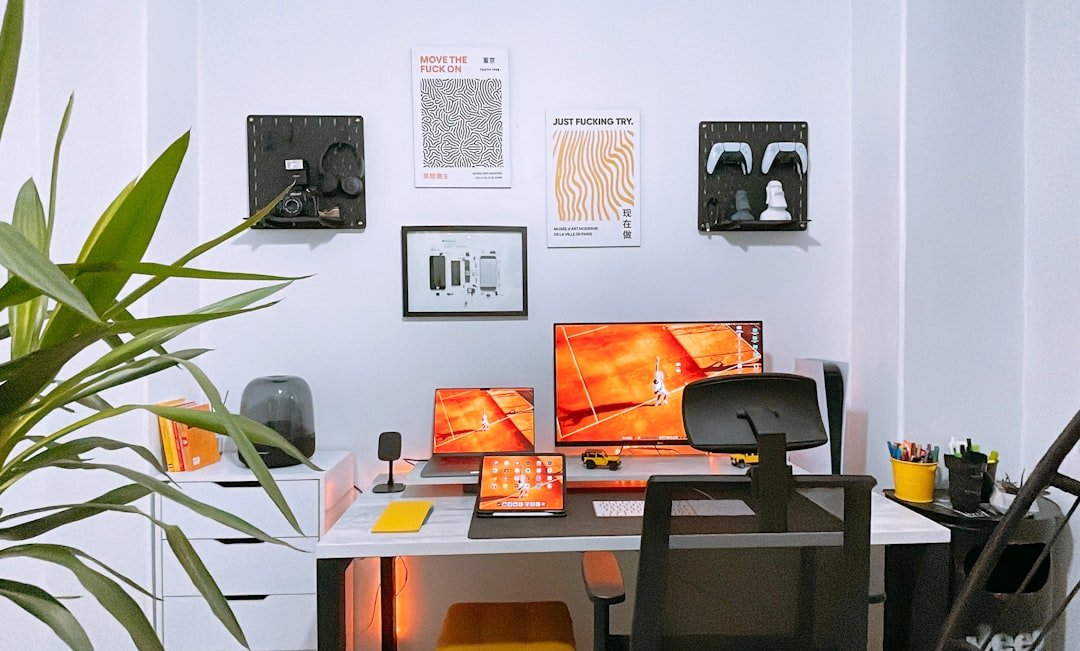
- Pegboards for hanging tools and notes
- Wall-mounted file holders
- Vertical file cabinets
Compact Desk Designs
Pick desks that fit tight spaces. Narrow or corner desks use less room but still provide work areas.
Desks with built-in cable management keep wires tidy. This reduces clutter on the desktop.
- Wall-mounted fold-down desks
- Corner desks with shelves
- Desks with slim drawers
- Standing desks with small footprints
Separate Work Zones
Creating separate work zones in a shared home office helps improve focus. It allows each person to have their own space to work without distractions.
Using different methods to divide the room can make the office feel organized and comfortable for everyone.
Room Dividers And Screens
Room dividers and screens can separate work areas without building walls. They add privacy and help reduce visual distractions.
- Use folding screens to create flexible zones.
- Place bookshelves as natural dividers between desks.
- Try curtains that can be pulled to block noise and sight.
- Choose dividers that match the room’s style and colors.
Zoning With Rugs And Lighting
Rugs and lighting help define each work zone clearly. They add warmth and a personal touch to each area.
| Element | Use | Effect |
|---|---|---|
| Rugs | Place under desks or seating | Marks boundaries visually and adds comfort |
| Task Lighting | Desk lamps or adjustable lights | Focuses light on work area, reduces eye strain |
| Ambient Lighting | Ceiling or wall lights | Creates overall room brightness and mood |
Soundproofing Techniques
Soundproofing helps keep noise from disturbing others in shared spaces. Simple changes can improve quietness greatly.
- Install thick curtains or acoustic panels on walls.
- Use rugs and carpets to absorb sound.
- Add weather stripping to doors and windows.
- Place bookshelves filled with books to block noise.
Personalize Your Area
Sharing a home office space can be challenging. Personalizing your area helps make it feel like your own.
Adding small touches improves comfort and boosts focus during work hours.
Color Coding And Decor
Use color coding to separate your supplies and documents from others. This keeps things neat and easy to find.
Choose decor that reflects your style. A few simple items can brighten your work zone and lift your mood.
- Assign colors for folders, notebooks, and pens
- Use desk mats or trays in your chosen color
- Add a small plant or artwork you like
- Pick a lamp with a color that suits your taste
Customizable Desk Accessories
Choose desk items that you can adjust or personalize. This lets you arrange your space for comfort and efficiency.
Customizable accessories help keep your desk tidy and show your personality.
- Adjustable monitor stands for eye-level viewing
- Pen holders with your name or favorite colors
- Sticky notes in shapes or colors you prefer
- File organizers that fit your style
Incorporating Personal Touches
Add items that remind you of happy moments or goals. These make your space feel welcoming and inspiring.
Personal touches can be small but meaningful. They help reduce stress and make work more enjoyable.
- Photos of family or friends
- A favorite mug for coffee or tea
- Inspirational quotes or notes
- Small souvenirs from trips or hobbies

Credit: www.digsdigs.com
Optimize Lighting
Good lighting is important in a shared home office. It helps everyone see well and work comfortably.
Using the right lighting reduces eye strain and keeps the space bright and inviting.
Natural Light Utilization
Natural light makes the office feel open and fresh. Place desks near windows to get sunlight.
Use sheer curtains to soften light and avoid harsh shadows on screens.
- Arrange desks to face or sit beside windows
- Use light-colored walls to reflect sunlight
- Keep windows clean for clear light
Task Lighting Solutions
Task lighting helps focus on detailed work. Each person should have a lamp for their desk.
Choose adjustable lamps to direct light where needed without lighting the whole room.
- Use LED desk lamps with adjustable arms
- Pick lamps with warm light to reduce harshness
- Place lights to avoid shadows on work areas
Reducing Glare And Eye Strain
Glare from screens and lights can cause headaches and tired eyes. Position screens away from windows.
Use matte screen protectors and anti-glare bulbs to reduce reflections and brightness.
- Angle monitors to avoid direct light reflection
- Use blinds or curtains to control sunlight
- Choose bulbs with soft, even lighting
Cable And Tech Management
Organizing cables and tech devices in a shared home office can be tricky. With the right tools, you can keep your workspace neat and efficient. Let’s explore some ideas to manage cables and tech effectively.
Using wireless devices, cable organizers, and setting up tech for multiple users can transform your shared home office. These ideas help reduce clutter and improve productivity.
Wireless Device Options
Wireless devices reduce the number of cables in your office. These devices include wireless keyboards, mice, and printers. They connect to your computer via Bluetooth or Wi-Fi, cutting down on desk clutter.
- Wireless keyboard and mouse
- Bluetooth speakers
- Wireless printer
Cable Organizers And Trays
Cable organizers keep cords neat and untangled. Trays help hide cables under desks. Use cable ties, clips, or sleeves to group and manage cables efficiently. This keeps your workspace clean.
- Cable ties and clips
- Under-desk cable trays
- Cable sleeves
Tech Setup For Multiple Users
In a shared office, set up tech to accommodate everyone. Use a docking station to connect multiple devices easily. Shared monitors or printers can be accessed by all users without moving cables.
| Shared Device | Benefits |
| Docking Station | Connects multiple devices |
| Shared Monitor | Reduces need for extra screens |
| Network Printer | Accessible by all users |
Storage Solutions
Creating a shared home office means finding smart ways to store items. Good storage keeps the space tidy and easy to use.
Use storage solutions that work well for everyone sharing the office. This helps avoid clutter and saves time.
Shared Filing Systems
Organize papers with a shared filing system. Label folders clearly so all users find documents fast.
- Use color-coded folders for different categories
- Keep digital copies backed up in shared cloud storage
- Set rules for filing and removing papers
- Use a central filing cabinet or box
- Review and update files regularly
Hidden Storage Ideas
Hidden storage keeps your office neat by tucking away items out of sight. Use space wisely.
| Storage Spot | Use |
| Under desk drawers | Store stationery and small tools |
| Wall shelves with baskets | Hide supplies and cables |
| Behind door racks | Keep files or books |
| Storage ottomans | Store papers or gadgets |
Decluttering Tips
Decluttering helps keep the shared office tidy. It reduces stress and improves focus.
- Sort items into keep, toss, and donate piles
- Clear your desk at the end of each day
- Use containers to group similar items
- Limit personal items to a small space
- Schedule monthly cleanups with all users
Ergonomic Considerations
Setting up a shared home office requires special attention to comfort. Ergonomics helps reduce strain and boost focus.
Good ergonomic habits protect your body during long work hours. This guide covers key ideas to improve your space.
Adjustable Chairs And Desks
Chairs and desks that adjust to fit each user reduce aches. They support good posture and help avoid discomfort.
- Choose chairs with adjustable height and lumbar support.
- Desks should allow sitting and standing positions.
- Make sure feet rest flat on the floor or on a footrest.
- Armrests help keep shoulders relaxed and elbows close.
Proper Monitor Placement
Placing your monitor correctly prevents neck and eye strain. The screen should be at eye level and an arm’s length away.
| Tip | Details |
|---|---|
| Height | Top of screen at or just below eye level. |
| Distance | About 20-30 inches from your eyes. |
| Angle | Screen tilted slightly upward, about 10-20 degrees. |
| Lighting | Avoid glare by positioning monitor away from bright windows. |
Encouraging Movement Breaks
Regular breaks help refresh your body and mind. They reduce fatigue and improve productivity.
Try these simple activities during breaks:
- Stand up and stretch your arms, legs, and back.
- Walk around the room or house for a few minutes.
- Do neck rolls to release tension.
- Practice deep breathing to relax.
Incorporate Greenery
Adding plants to your shared home office can enhance the environment. Greenery can make the space feel more alive and vibrant.
Plants can also improve air quality and reduce stress. They are a simple way to make your office more inviting.
Low-maintenance Plants
Some plants are easier to care for than others. Choose plants that do not need much attention.
These plants are perfect for busy people. They require minimal watering and care.
- Succulents
- Snake plant
- Pothos
- ZZ plant
Benefits Of Indoor Plants
Indoor plants can improve focus and productivity. They create a calming atmosphere in your workspace.
Plants also help reduce noise levels. They can absorb sound and make the office quieter.
- Improve air quality
- Boost mood
- Increase creativity
- Reduce stress
Plant Placement Ideas
Place plants in spots with enough light. Make sure they are easy to reach for watering.
You can put small plants on desks. Larger plants can go in corners or near windows.
- Desk corners
- Window sills
- Bookshelves
- Floor planters
Credit: www.extraspace.com
Frequently Asked Questions
What Are The Best Shared Home Office Layout Ideas?
Open-plan layouts with separate zones work best. Use desks back-to-back or side-by-side for efficient space use. Add dividers or shelves to create privacy. Ensure enough lighting and storage for each user. This boosts productivity and comfort in shared offices.
How To Maximize Space In A Shared Home Office?
Use vertical storage like shelves and wall organizers. Opt for compact, multifunctional furniture. Keep desks clear and clutter-free. Utilize under-desk storage options. These tips help create an organized, spacious shared work area without overcrowding.
What Furniture Suits A Shared Home Office Setup?
Choose adjustable desks and ergonomic chairs for comfort. Modular desks help customize space. Include storage units like filing cabinets or shelves. Select furniture that fits the room size and allows personal adjustments for each user.
How To Manage Noise In A Shared Home Office?
Use noise-canceling headphones or white noise machines. Add rugs, curtains, or acoustic panels to absorb sound. Position desks away from noisy areas. Clear communication about quiet times also helps maintain focus and reduce distractions.
Conclusion
Sharing a home office can be simple and effective. Clear rules help keep the space organized. Choose furniture that fits both users well. Good lighting makes work easier for everyone. Personal touches bring comfort and motivation. Keep clutter low to stay focused all day.
Small changes can improve your shared office a lot. Enjoy working side by side in a neat, calm place. This way, both can work happily and productively.