Your bedroom is more than just a place to sleep—it can be your ultimate gaming sanctuary. Imagine diving into your favorite games with a setup that’s not only powerful but also comfortable and stylish.
Whether you’re a casual player or a serious gamer, the right bedroom setup can boost your focus, improve your performance, and make every gaming session unforgettable. Ready to transform your space into the gaming haven you deserve? Keep reading, and discover how to create the perfect bedroom setup for gaming that fits your style and needs.
Choosing The Right Space
Setting up a gaming area in your bedroom needs careful thought. The right space affects comfort and performance. You want a spot that fits your gear and lets you play well.
This guide helps you pick the best place in your room. We focus on room size, lighting, and noise control. These points make your gaming setup better.
Maximizing Room Size
Use the largest open area in your bedroom for gaming. Avoid tight corners and clutter. This gives you space for your desk, chair, and accessories.
- Clear out unused furniture to free space.
- Place your setup near a wall to save room center.
- Keep cables organized to avoid mess and trips.
- Choose compact gear to fit smaller rooms.
Lighting Considerations
Good lighting reduces eye strain and improves focus. Natural light is best but avoid glare on your screen. Use soft, adjustable lights for comfort during night play.
| Lighting Type | Benefits | Tips |
| Natural Light | Bright and easy on eyes | Use curtains to control glare |
| LED Desk Lamp | Adjustable brightness and color | Place to side of monitor |
| Ambient Lighting | Creates soft background light | Use dimmable bulbs |
Noise Control Tips
Quiet space helps you focus and enjoy games. Block outside sounds and reduce echo inside your room. Soft materials help absorb noise.
- Use thick curtains or blinds on windows
- Add rugs or carpets to floors
- Place cushions or soft chairs near your setup
- Seal gaps around doors to block noise

Credit: www.youtube.com
Essential Gaming Furniture
Setting up a gaming space in your bedroom needs the right furniture. Good furniture helps you play longer and feel comfortable.
This guide covers three key pieces: chairs, desks, and storage. Each piece supports your gaming in a different way.
Ergonomic Chairs
An ergonomic chair supports your back and neck. It helps reduce strain during long gaming sessions.
- Look for adjustable height and armrests
- Choose chairs with lumbar support
- Pick breathable materials for comfort
- Swivel and wheels help move around easily
Desks For Comfort And Function
A good desk holds your monitor, keyboard, and other gear. It should be the right height for your chair.
| Desk Feature | Benefit |
| Adjustable Height | Fits different chair heights |
| Wide Surface | More space for multiple screens |
| Cable Management | Keeps cords tidy and out of the way |
| Sturdy Build | Supports heavy monitors and equipment |
Storage Solutions
Storage keeps your gaming area neat. It holds games, controllers, and accessories.
Consider these storage options:
- Shelves for game cases and collectibles
- Drawers for cables and small items
- Hooks or racks for headphones and controllers
Tech Setup And Accessories
Creating a good gaming setup in your bedroom can improve your play experience. The right tech and accessories help you play better and feel comfortable.
This guide covers important parts like monitors, computers, and input devices for your gaming space.
Selecting Monitors And Screens
Choose a monitor with a fast refresh rate for smooth gameplay. A screen size between 24 and 32 inches works well for most desks.
Look for monitors with low response times. This reduces blur during fast action scenes.
- 1080p or 1440p resolution for clear images
- Refresh rates of 60Hz or higher
- IPS panels for better color accuracy
- Curved screens for immersive views
High-performance Pcs And Consoles
Choose a PC or console that matches the games you want to play. High performance means better graphics and fewer delays.
Make sure your system has enough storage for your games and updates. Good cooling keeps your setup running well during long sessions.
- Powerful CPU and GPU for smooth gameplay
- At least 16GB of RAM for multitasking
- Fast SSD storage for quick loading
- Efficient cooling systems
Keyboards, Mice, And Controllers
Pick keyboards and mice that feel comfortable and respond quickly. Mechanical keyboards offer better feedback for many gamers.
Controllers work well for certain games and consoles. Wireless options give more freedom but need charging.
- Mechanical or membrane keyboards based on preference
- High DPI mice for accurate movement
- Ergonomic designs to reduce hand strain
- Wired or wireless controllers depending on setup
Creating The Right Ambiance
Setting up a bedroom for gaming needs more than just a good chair and desk. The right ambiance helps you focus and enjoy your time. Small changes can make a big difference in your gaming space.
This guide covers lighting, sound, and decor ideas to build a perfect gaming environment in your bedroom.
Rgb Lighting Ideas
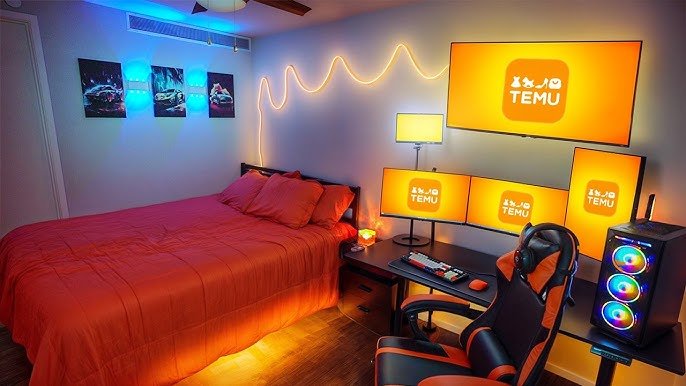
RGB lights add color and mood to your gaming area. They can change to match your game or your mood. Use strips, bulbs, or desk lamps to create effects.
- Place LED strips behind your monitor or desk
- Use smart bulbs to control colors with your phone
- Add a backlight to your shelves or gaming chair
- Sync lights with your game sounds for real-time effects
Sound Systems And Headsets
Good sound makes games more immersive. You can use speakers or headsets to hear every detail. Choose devices that fit your space and comfort needs.
| Device Type | Pros | Cons |
| Speakers | Fill room with sound, share audio | May disturb others |
| Wired Headsets | Reliable connection, no lag | Wires can tangle |
| Wireless Headsets | More freedom of movement | Need charging |
Decor And Theming
Decor sets the style of your gaming space. Pick a theme that matches your favorite games or personal taste. Use posters, collectibles, and furniture to complete the look.
Popular decor ideas include:
- Game-themed wall art or decals
- Display shelves for figures and memorabilia
- Comfortable seating with themed cushions
- Rugs or curtains in matching colors
Cable Management Tricks
Good cable management keeps your bedroom gaming area neat. It helps avoid tangled wires and makes cleaning easier.
Organizing cables also protects your gear and improves the room’s look. Here are some tips to manage cables well.
Hiding And Organizing Cables
Hide cables behind furniture or under the desk to keep them out of sight. Use clips or ties to group cables together.
Label each cable to know which one connects to what. This makes it easier to unplug or move devices later.
- Use cable sleeves to bundle wires neatly
- Attach cable clips to the back of your desk
- Run cables along walls with adhesive hooks
- Keep power cords away from data cables to reduce interference
Power Supply Planning
Plan your power needs before setting up your gaming area. Check how many outlets you need for all devices.
Use a power strip with surge protection to keep your devices safe. Avoid overloading a single outlet to prevent problems.
- Count all devices to know power requirements
- Choose power strips with enough sockets
- Place power strips where cables stay hidden
- Use extension cords only if necessary and safely
Safety Considerations
Keep cables away from walking paths to avoid trips. Do not run cords under rugs or heavy furniture where they can get damaged.
Check cables regularly for wear or damage. Replace any frayed wires to prevent electrical hazards.
- Secure cables to walls or desks to prevent tripping
- Do not overload power outlets
- Keep liquids away from cables and power sources
- Use cable protectors if cables cross open spaces

Credit: xrockergaming.com
Optimizing Comfort And Health
Creating a gaming setup in your bedroom can be both fun and relaxing. It is important to focus on comfort and health to enjoy long gaming sessions.
A few adjustments can make your gaming area ideal for both enjoyment and well-being.
Posture Tips
Good posture helps prevent back pain and keeps your focus sharp. Adjust your chair and desk to support your spine.
- Keep your feet flat on the ground
- Align your screen at eye level
- Use a chair with lumbar support
Break Reminders
Taking regular breaks is essential for maintaining health during gaming. Short pauses refresh your mind and body.
Set a timer to remind you every hour:
- Stand and stretch
- Rest your eyes by looking away from the screen
- Walk around the room
Ventilation And Temperature Control
Good airflow and a comfortable temperature can improve your gaming experience. Keep your room well-ventilated and cool.
| Action | Benefit |
| Open windows | Fresh air |
| Use a fan | Better circulation |
| Adjust thermostat | Comfortable temperature |
Personalizing Your Play Zone
Your bedroom gaming setup should reflect your unique style. Personalizing your play zone makes gaming more enjoyable. Use different elements to create a space that feels like home.
Think about what inspires you. Add items that make you feel excited to game. This can include collectibles, art, and accessories that show off your personality.
Collectibles And Memorabilia
Collectibles are a fun way to personalize your gaming area. Display your favorite game characters on shelves. Add memorabilia to remind you of past gaming achievements.
- Action figures of game heroes
- Posters from gaming events
- Models of classic game consoles
Custom Wall Art
Wall art can transform your space. Choose art that speaks to you. This can be custom pieces or prints from your favorite games.
Consider creating a gallery wall. Mix and match different sizes and styles. This adds depth and interest to your room.
Gaming-themed Accessories
Accessories enhance your gaming experience. They can be both functional and decorative. Choose items that complement your setup.
- Custom mouse pads with game images
- LED lights that match your gaming theme
- Cushions with game logos

Credit: www.lorddecor.com
Frequently Asked Questions
What Is The Ideal Gaming Setup For A Bedroom?
An ideal bedroom gaming setup balances comfort, space, and equipment. Prioritize a quality chair, desk, and ergonomic placement. Good lighting and cable management enhance the experience. Personalize with decorations that reflect your gaming style.
How Can I Optimize Space For Gaming In A Small Bedroom?
Use compact furniture like corner desks and wall mounts. Opt for wireless peripherals to reduce clutter. Keep cables organized with clips or sleeves. Utilize vertical storage for games and accessories. Maximize natural light to open the space visually.
What Are The Best Lighting Options For Bedroom Gaming?
LED strip lights and smart bulbs provide customizable lighting. Avoid harsh overhead lights to reduce screen glare. Use bias lighting behind monitors to reduce eye strain. Adjustable desk lamps help focus on your gaming area.
How Do I Reduce Noise In A Bedroom Gaming Setup?
Use soundproofing foam panels on walls to absorb noise. Add rugs and curtains to minimize echo. Opt for noise-cancelling headphones for immersive gameplay. Close doors and windows to block external sounds effectively.
Conclusion
A good bedroom gaming setup makes playtime more fun and comfortable. Choose the right desk, chair, and lighting to suit your space. Keep cables neat to avoid clutter and distractions. Personal touches like posters or LED lights add style and mood.
Small changes can make a big difference in your gaming experience. Enjoy your games in a space that feels just right for you. Simple, smart choices help you relax and focus better. Create a spot where gaming feels easy and fun every day.