Your gamer bedroom setup is more than just a place to play—it’s your personal command center. Imagine stepping into a room that fuels your focus, boosts your energy, and makes every gaming session unforgettable.
Whether you’re aiming to level up your space or build your dream setup from scratch, this guide will show you how to create a bedroom that fits your style and enhances your gameplay. Ready to transform your space and take your gaming experience to the next level?
Let’s dive in.

Credit: www.reddit.com
Choosing The Right Room
Selecting the right room is important for a good gamer bedroom setup. The room should fit your gaming needs and comfort.
Think about space, lighting, and sound before setting up your gaming area.
Space And Layout
Pick a room with enough space for your desk, chair, and gaming gear. Avoid tight or cluttered rooms.
- Choose a room with at least 100 square feet for comfort.
- Place your desk near a power outlet.
- Keep room for shelves or storage.
- Allow space to move without bumping into things.
- Arrange furniture to avoid glare on your screen.
Lighting Considerations
Good lighting reduces eye strain and helps you focus during gaming sessions.
| Lighting Type | Benefits | Tips |
| Natural Light | Bright and soft | Use curtains to control brightness |
| Overhead Light | Even room lighting | Use LED bulbs with warm tones |
| Task Lighting | Focus on desk area | Use adjustable desk lamps |
Soundproofing Tips
Soundproofing makes your room quieter and blocks outside noise for better focus.
Try these simple soundproofing tips:
- Use thick curtains on windows.
- Place rugs or carpets on the floor.
- Add foam panels or soft materials on walls.
- Seal gaps around doors and windows with weatherstripping.
- Use a door sweep to block sound under the door.
Essential Gaming Furniture
A good gamer bedroom setup needs the right furniture. It helps you play longer and feel comfortable.
Choosing the best furniture can improve your focus and keep your space organized.
Ergonomic Chairs
Ergonomic chairs support your back and neck during long gaming sessions. They reduce pain and improve posture.
Look for chairs with adjustable height, armrests, and lumbar support. These features help you sit comfortably.
- Adjustable seat height
- Lumbar and neck support
- Comfortable cushioning
- Swivel and tilt functions
Desks For Gamers
Gaming desks should be wide and strong to hold your gear. A spacious desk helps keep your setup neat.
Choose desks with cable management to reduce clutter. Adjustable desks let you change height for sitting or standing.
- Large surface area
- Sturdy build
- Cable management system
- Height adjustability
Storage Solutions
Storage keeps your gaming space clean. Use shelves, drawers, or boxes to store games and accessories.
Organized storage saves time when you need your gear. It also protects your equipment from damage.
- Wall shelves for extra space
- Drawers under the desk
- Boxes for cables and controllers
- Hooks for headphones
Display And Monitor Setup
A good display setup is key for a gamer bedroom. The right monitor improves your gaming view and comfort.
Choosing the right screens and how you arrange them makes your setup more enjoyable and effective.
Choosing The Best Monitor
Look for a monitor with a fast refresh rate and low response time. These features reduce blur and lag in games.
The screen size and resolution also matter. Bigger screens and higher resolutions give clearer images.
Multiple Screen Arrangements
Using more than one monitor can increase your gaming space and multitasking ability.
- Side-by-side monitors for wider views
- Stacked screens for vertical space saving
- Curved displays for immersive experience
- One main screen with smaller side screens
Mounting Options
Mounting your monitors frees up desk space and improves viewing angles.
| Mount Type | Benefits | Drawbacks |
| Wall Mount | Saves desk space, clean look | Needs strong wall and installation |
| Desk Mount Arm | Adjustable height and angle | Takes desk space, can be costly |
| Stand Only | Easy setup, no installation | Uses desk space, less flexible |

Credit: www.thecoolist.com
Gaming Pc And Console Placement
Setting up your gaming PC and console correctly is important. It helps you play comfortably and keeps your gear safe.
Good placement improves your gaming space. It also makes your setup look neat and organized.
Optimal Positioning
Place your gaming PC and console where you can reach them easily. Keep screens at eye level to avoid neck pain.
Make sure your chair and desk allow good posture. Leave space for controllers and accessories nearby.
- Keep devices on a sturdy desk or shelf
- Position monitors to reduce glare
- Allow space for comfortable hand movement
Cooling And Ventilation
Good airflow prevents your gaming PC and console from overheating. Overheating can cause slowdowns or damage.
Avoid placing devices in closed cabinets or near heat sources. Leave space around vents for air to flow freely.
- Keep devices at least a few inches from walls
- Use fans or cooling pads if needed
- Clean dust from vents regularly
Cable Management
Organize cables to keep your setup tidy and safe. Tangled cables can cause trips or damage ports.
Use clips, ties, or sleeves to group cables. Label cables to find devices quickly.
- Bundle cables using Velcro or zip ties
- Route cables behind desks or walls
- Keep power and data cables separate
Lighting For Ambience
Lighting plays a big role in setting the mood in a gamer bedroom. Good lighting helps create a relaxing and immersive space.
Choosing the right lights can improve focus and make gaming more enjoyable. Different lights work for different times and moods.
Rgb Lighting Ideas
RGB lighting adds color and style to your gaming space. You can change colors to match your game or mood.
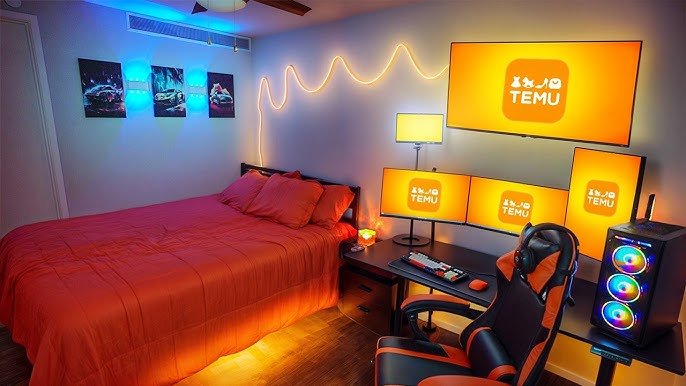
Use LED strips behind your desk or monitor for a soft glow. Place RGB lamps or light panels around the room for extra effect.
- Install LED strips under the desk edges
- Use color-changing lamps on shelves or tables
- Try light panels on walls for patterns and shapes
- Sync lights with game sounds or music
Natural Vs Artificial Light
Natural light comes from windows and is good during the day. It helps keep you alert and refreshed.
Artificial light is needed at night or in dark rooms. It lets you control brightness and color easily.
- Use curtains to control sunlight and reduce glare
- Place your desk near a window for daytime gaming
- Choose soft white bulbs for less eye strain
- Adjust artificial lights based on time and activity
Smart Lighting Systems
Smart lights let you change colors and brightness with apps or voice commands. They add convenience and style.
You can set schedules or scenes for different moods. Smart lights often work with other smart devices in your room.
- Control lights from your phone or smart speaker
- Set timers to turn lights on or off automatically
- Create scenes for gaming, relaxing, or reading
- Sync lights with music or games for more fun
Sound System And Acoustics
A gamer bedroom setup needs the right sound system. Acoustics are crucial for an immersive experience. Choose wisely to enhance your gaming sessions.
Let’s explore different options for sound systems and how to improve room acoustics.
Speakers Vs Headsets
Speakers and headsets each have their benefits. It depends on your preference and space.
- Speakers provide a surround sound effect.
- Headsets offer privacy and direct sound.
- Consider room size and noise levels.
Acoustic Panels
Acoustic panels reduce noise and echo. They improve sound quality in your room.
Install panels on walls to minimize sound reflections.
Noise Control
Keeping noise levels down is important. This helps in maintaining focus and not disturbing others.
| Method | Effectiveness |
| Thick curtains | High |
| Rugs | Medium |
| Sealing doors | High |
Decor And Personal Touches
Creating a gamer bedroom setup is all about making it your own. Decor and personal touches reflect your gaming style and personality.
From themed decorations to wall art, every detail counts. Add collectibles to showcase your passion.
Themed Decorations
Themed decorations can transform your room into a gaming haven. Choose items that match your favorite game or console.
- Select a color scheme that reflects your game’s theme.
- Use LED lights for an immersive atmosphere.
- Incorporate game-related furniture like chairs or shelves.
Posters And Wall Art
Posters and wall art add character to your gaming space. They can feature game characters, scenes, or logos.

Collectibles And Memorabilia
Display collectibles and memorabilia to highlight your gaming journey. These can include figures, badges, or limited editions.
| Item | Description |
| Action Figures | Figures of your favorite game characters |
| Badges | Earned through gaming achievements |
| Limited Editions | Special releases from game launches |
Tech Accessories And Gadgets
A great gamer bedroom setup needs the right tech accessories. These gadgets help improve your play and comfort. They also keep your space neat and ready.
From controllers to VR gear, choosing the right tools makes a big difference. Let’s look at some popular tech accessories for your setup.
Controllers And Keyboards
Controllers and keyboards are the main way to play games. Pick ones that feel good and work well for your style. Mechanical keyboards give fast response and better feedback. Wireless controllers reduce cable clutter and add freedom of movement.
- Mechanical keyboards with customizable keys
- Wireless controllers with long battery life
- Ergonomic designs to reduce hand strain
- RGB lighting for better visibility
Charging Stations
Charging stations keep your devices powered and organized. They help avoid tangled cables and missing chargers. Some stations charge multiple devices at once. Look for fast charging and compact designs.
| Feature | Benefit |
| Multi-device charging | Charge controller, headset, phone at once |
| Fast charging | Spend less time waiting for power |
| Compact size | Save desk space and reduce clutter |
| LED indicators | Show charging status clearly |
Vr And Streaming Gear
VR gear lets you step inside games and explore new worlds. Streaming tools help share your gameplay online. Both need good quality and comfort for long sessions. Headsets, cameras, and microphones are key parts of this setup.
Popular VR and streaming gadgets include:
- VR headsets with high resolution
- Webcams for clear video streaming
- Noise-cancelling microphones
- Lighting kits to improve video quality
Maintaining Your Gaming Space
Keeping your gaming bedroom clean and organized helps improve your experience. A tidy space reduces stress and makes gaming more fun. Regular care also protects your equipment and keeps it working well.
Focus on simple habits that keep everything neat. Small changes in your routine can make a big difference. Let’s look at some tips for cleaning, upgrading, and organizing your gaming area.
Cleaning Tips
Dust and dirt can harm your devices and make your room uncomfortable. Clean your gaming space often to avoid this. Use soft cloths and proper cleaners for screens and keyboards.
- Wipe down monitors and screens gently with microfiber cloths
- Use compressed air to clean keyboards and vents
- Vacuum the floor and around your desk regularly
- Remove trash and empty bins daily
- Keep snacks and drinks away from electronics
Upgrading Components
Upgrading parts of your setup can improve your gaming comfort and performance. Choose components that fit your needs and space. Replace old or broken items to avoid problems.
| Component | Upgrade Benefit | When to Upgrade |
| Monitor | Better display and faster refresh rates | Screen flickers or low resolution |
| Chair | More comfort and support | Back pain or worn padding |
| Keyboard | Faster response and durability | Sticky or unresponsive keys |
| Headset | Clearer sound and mic quality | Audio issues or discomfort |
Organizing Cables And Gear
Cables and gear can create clutter and trip hazards. Keep cables tidy and gear stored properly. Label cords to know what they connect to. Use cable ties or sleeves to group wires.
- Use cable clips or Velcro strips to secure wires
- Store controllers and accessories on shelves or holders
- Keep frequently used items within easy reach
- Label power strips and chargers clearly
- Regularly check cables for damage and replace if needed

Credit: www.youtube.com
Frequently Asked Questions
What Essential Gear Improves A Gamer Bedroom Setup?
A quality gaming chair, desk, and multi-monitor setup enhance comfort and gameplay. Good lighting and sound systems also boost the experience.
How To Optimize Lighting In A Gamer Bedroom Setup?
Use adjustable LED lights or RGB strips for mood and visibility. Avoid glare on screens and consider blackout curtains to control natural light.
What Are The Best Desk Types For Gamers?
L-shaped or height-adjustable desks offer space and comfort. Choose sturdy desks with cable management to keep your setup tidy and efficient.
How To Organize Cables In A Gamer Bedroom Setup?
Use cable clips, sleeves, or under-desk trays to keep cables neat. Proper cable management prevents tangling and improves room aesthetics.
Conclusion
A good gamer bedroom setup makes playing more fun and comfortable. Choose the right chair and desk to fit your space. Keep cables neat and add soft lighting for a cool look. Personal touches like posters or collectibles make the room yours.
Small changes can improve focus and help you enjoy games longer. Start with basics and adjust as you go. This way, your gaming space grows with you. Enjoy your games in a room that feels just right.