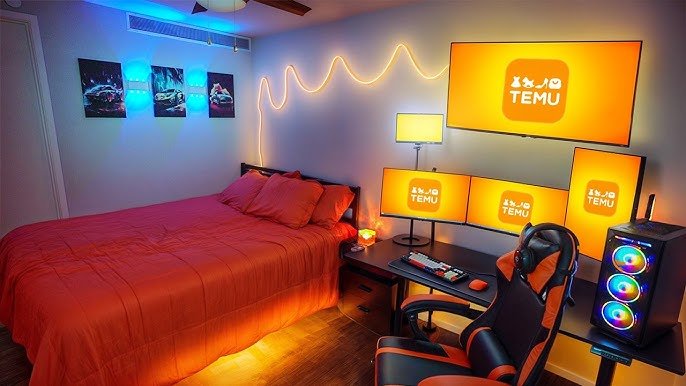
Your bedroom can be the perfect place to start or upgrade your streaming setup. Imagine having everything you need right within reach, creating a cozy and efficient space that makes streaming fun and easy.
Whether you’re just starting out or want to improve your current setup, this guide will help you create a bedroom streaming setup that fits your style and boosts your performance. Keep reading to discover simple tips and smart ideas that will transform your space and make your streams shine.
Choosing The Right Space
Setting up a bedroom streaming area starts with picking the best spot. The right space helps you focus and look good on camera.
Think about quietness, layout, and lighting to create a great streaming setup in your bedroom.
Finding A Quiet Corner
Choose a corner far from noise sources like windows, doors, or electronics. This reduces background sounds during streams.
- Pick a spot away from busy household areas
- Use rugs or curtains to absorb sound
- Close doors and windows while streaming
- Consider noise-canceling headphones for extra quiet
Optimizing Room Layout
Arrange your furniture to create a comfortable and efficient streaming space. Keep your desk and chair in easy reach of equipment.
| Item | Placement Tip |
| Desk | Near power outlets and natural light |
| Chair | Comfortable and adjustable |
| Microphone | Close to your mouth but out of camera view |
| Camera | At eye level and stable |
Managing Lighting Conditions
Good lighting helps you look clear and sharp on camera. Avoid harsh shadows or bright spots behind you.
Try these lighting tips:
- Use soft, even light sources in front of you
- Close blinds to reduce sunlight glare
- Use a desk lamp with adjustable brightness
- Consider ring lights for balanced illumination
Essential Streaming Gear
Setting up a bedroom streaming space needs the right gear. Good equipment helps you look and sound clear on camera.
This guide covers key items you need to build a solid streaming setup at home.
Selecting A Quality Webcam
Choose a webcam with at least 1080p resolution. This ensures sharp video for your viewers. Look for models with good low-light performance. A wide-angle lens helps include more background if needed.
Microphone Options For Clear Audio
- USB microphones are easy to use and offer good sound quality.
- Condenser mics capture clear, detailed audio but may need an audio interface.
- Dynamic microphones work well in noisy rooms by reducing background noise.
- Consider a pop filter to reduce unwanted sounds like “p” and “b” pops.
Choosing A Comfortable Chair
A comfortable chair supports long streaming sessions. Look for chairs with good back support and adjustable height. Breathable materials keep you cool. Avoid chairs that cause strain or pain.
Desk Setup Tips
| Tip | Reason |
| Keep desk clean and clutter-free | Improves focus and camera view |
| Position monitor at eye level | Reduces neck strain |
| Use a desk lamp with soft light | Enhances video lighting |
| Have space for microphone and accessories | Organizes equipment for easy use |
Improving Audio Quality
Good audio quality makes your bedroom streaming more enjoyable. Clear sound helps your viewers understand you better. Small changes can reduce noise and echo in your room.
Focus on controlling sound reflections and background noise. This guide covers soundproofing, using acoustic panels, and microphone placement tips.
Soundproofing Basics
Soundproofing stops outside noise from disturbing your stream. It also keeps your voice from echoing in the room. You do not need expensive materials to start soundproofing.
- Close windows and doors tightly to block noise
- Use thick curtains over windows
- Place rugs or carpets on the floor
- Seal gaps around doors with weatherstripping
- Use heavy furniture to absorb sound
Using Acoustic Panels
Acoustic panels reduce echo and improve sound clarity. Place them on walls where sound bounces the most. Panels come in many sizes and colors to fit your style.
| Panel Location | Effect |
| Behind your microphone | Reduces direct echo |
| Opposite wall | Balances sound reflection |
| Ceiling above desk | Blocks sound from above |
| Corners of the room | Absorbs low frequencies |
Microphone Placement Tricks
Where you place your microphone changes sound quality. Correct placement reduces background noise and captures your voice clearly.
- Keep the microphone 6-12 inches from your mouth
- Use a pop filter to reduce popping sounds
- Angle the microphone slightly to avoid breath noise
- Place it away from noisy devices like fans
- Test different spots to find the clearest sound

Credit: www.reddit.com
Lighting Techniques
Good lighting is important for a bedroom streaming setup. It helps viewers see you clearly. Lighting also sets the mood of your stream.
Understanding different lighting options can improve your video quality. Choose the right lights for your space and style.
Natural Vs Artificial Lighting
Natural light comes from the sun. It is soft and looks natural on camera. You can use windows to bring in sunlight.
Artificial light is made with lamps or LED lights. You can control it any time of day. It helps when natural light is not enough.
- Natural light is free and bright
- Artificial light works anytime
- Mix both for best results
- Watch for shadows with natural light
Best Types Of Streaming Lights
Ring lights are popular for streaming. They give even light and reduce shadows on your face. Many streamers use them.
Softbox lights spread light softly over a large area. They create a smooth look and reduce harsh shadows. LED panels are bright and adjustable.
- Ring lights for even face lighting
- Softbox lights for soft, wide light
- LED panels for brightness and control
- Desk lamps can work if placed well
Positioning Lights For Flawless Video
Place lights in front of you to light your face evenly. Avoid light behind you to stop shadows. Use multiple lights to fill dark spots.
Try these tips for lighting placement. Put one light slightly above eye level. Add another light at an angle to remove shadows. Use a backlight for depth.
- Main light in front, above eye level
- Fill light at side to soften shadows
- Backlight behind to separate you from background
- Adjust brightness to avoid glare
Optimizing Internet Connection
Good internet is key for a smooth bedroom streaming setup. A strong connection stops buffering and lag.
This guide covers ways to improve your internet for better streaming quality.
Wired Vs Wireless Options
Wired connections use cables to link your device to the router. Wireless uses Wi-Fi signals.
Wired is faster and more stable but less flexible. Wireless is easy to move but can be slower.
- Wired: low lag, steady speed
- Wireless: easy setup, less reliable
- Wired is best for serious streamers
- Wireless works for casual streaming
Boosting Wi-fi Speed
Place your router in a central spot in your room. Avoid walls and metal objects nearby.
Use the 5 GHz band if your router supports it. This band is faster and less crowded.
- Keep router away from electronics that cause interference
- Update your router firmware regularly
- Use Wi-Fi extenders to cover dead zones
- Limit devices using Wi-Fi during streaming
Recommended Bandwidth For Streaming
Streaming needs enough bandwidth to send video smoothly. Higher quality needs more speed.
Here are common bandwidth needs for popular stream qualities:
| Streaming Quality | Recommended Bandwidth |
|---|---|
| 720p (HD) | 3-5 Mbps |
| 1080p (Full HD) | 5-10 Mbps |
| 4K (Ultra HD) | 15-25 Mbps |
Decor And Ambiance
Creating a cozy streaming setup in your bedroom can enhance your online presence. The right decor and ambiance make your space inviting and unique.
Focus on elements that reflect your personality. This will make your streaming area comfortable and visually appealing.
Background Ideas
Your streaming background is important. It sets the scene for your audience. Think about what you want to display behind you.
- Use posters of favorite games or movies
- Add shelves with collectibles or books
- Hang an attractive tapestry or artwork
Using Led And Rgb Lights
LED and RGB lights can change the mood of your space. They add vibrant colors and make your setup look modern.
Adjust the brightness and color to match your style. Lights can also highlight key areas in your room.
- Strip lights for desks or shelves
- Color-changing bulbs for lamps
- Accent lights for walls or corners
Personalizing Your Streaming Space
Make your streaming area yours by adding personal touches. This makes your content more relatable and engaging.
Consider items that mean something to you. This could include gifts or achievements.
- Add photos of friends or family
- Display awards or certificates
- Include plants for a natural feel
Software And Streaming Platforms
Setting up a bedroom streaming space can be exciting. Choosing the right software and platform is key.
Different software offers unique features. Streamers need to pick tools that fit their needs.
Choosing Streaming Software
Streamers have several software options. Each software offers different features.
- OBS Studio: Open-source and highly customizable.
- Streamlabs: Integrated alerts and overlays.
- XSplit: User-friendly with professional tools.
Overlay And Alerts Setup
Overlays and alerts enhance the viewer experience. They provide interaction and updates.
Custom HTML can be used for advanced overlay designs.
Managing Stream Quality Settings
Stream quality affects viewer satisfaction. Streamers should adjust settings for optimal performance.
| Setting | Recommendation |
| Resolution | 720p for smooth streaming |
| Bitrate | 2500 kbps for clear video |
| Frame Rate | 30 fps for fluid motion |

Credit: xrockergaming.com
Cable Management Tips
Keeping cables tidy is important for a neat bedroom streaming setup. Good cable management helps avoid clutter and makes your space look clean.
Organizing cables also protects them from damage and makes it easier to find the right cords when needed.
Organizing Cables Efficiently
Start by sorting cables by type and length. Group similar cables together to reduce tangles.
Use labels to mark each cable. This helps you find the right one fast without unplugging everything.
- Sort cables by device or function
- Group cables with ties or bands
- Label cables with tags or tape
- Keep excess cable length coiled neatly
Tools For Cable Management
Use simple tools to keep cables in place. Cable ties and clips are cheap and easy to use.
Cable sleeves and boxes hide multiple cords and keep them from tangling. Velcro straps let you adjust cables easily.
- Cable ties to bind cables together
- Cable clips to attach cables to surfaces
- Cable sleeves to cover groups of cables
- Velcro straps for reusable bundling
- Cable boxes to hide power strips and plugs
Maintaining A Clean Setup
Check your cables often to keep them tidy. Fix loose or tangled cables right away.
Clean dust from cables and devices. Dust buildup can harm your equipment and make the space look messy.
- Inspect cables regularly for damage
- Rearrange cables if they become tangled
- Dust cables and devices weekly
- Replace damaged cables promptly

Credit: www.youtube.com
Frequently Asked Questions
What Is Essential For A Bedroom Streaming Setup?
A good bedroom streaming setup needs a quality camera, microphone, and lighting. A stable internet connection is vital. Comfortable seating and desk space improve your streaming experience. Organize cables for a tidy look. These basics create a professional and cozy streaming environment.
How To Optimize Lighting For Bedroom Streaming?
Use soft, diffused lighting to avoid harsh shadows. Natural light is ideal but add LED ring lights or softboxes. Position lights in front to illuminate your face evenly. Avoid bright backlighting that causes silhouette effects. Proper lighting enhances video quality and viewer engagement.
What Equipment Suits Small Bedroom Streaming Spaces?
Compact microphones like USB mics save space. Use a small tripod or desk mount for cameras. Choose multi-functional furniture to maximize space. Wireless headphones reduce cable clutter. Prioritize essential gear to keep the setup efficient and neat in limited rooms.
How To Reduce Background Noise During Streaming?
Use a quality microphone with noise-canceling features. Stream in a quiet room and close windows. Add soft furnishings like curtains or rugs to absorb sound. Consider soundproof panels if possible. These steps help deliver clear audio and improve viewer experience.
Conclusion
Creating a bedroom streaming setup can be simple and fun. Choose the right gear that fits your space and budget. Keep your background clean and neat to look professional. Good lighting makes your videos clear and bright. Test your sound to avoid distractions during streams.
Personal touches help you feel comfortable and confident. Start small and improve your setup over time. Enjoy sharing your passion with others from your own room.
