Your home office should work for you, not against you. Imagine sitting comfortably all day, feeling focused and free from aches.
That’s exactly what an ergonomic setup can do for your productivity and well-being. In this post, you’ll discover easy ideas to transform your workspace into a place that supports your body and sharpens your mind. Ready to create a home office that helps you work smarter and feel better?
Keep reading—you’ll find inspiration that’s simple, effective, and just right for you.
Choosing The Right Desk
Your desk is the center of your home office. Picking the right one helps you work comfortably.
Think about how you use your desk and what features will help you stay focused and healthy.
Adjustable Height Options
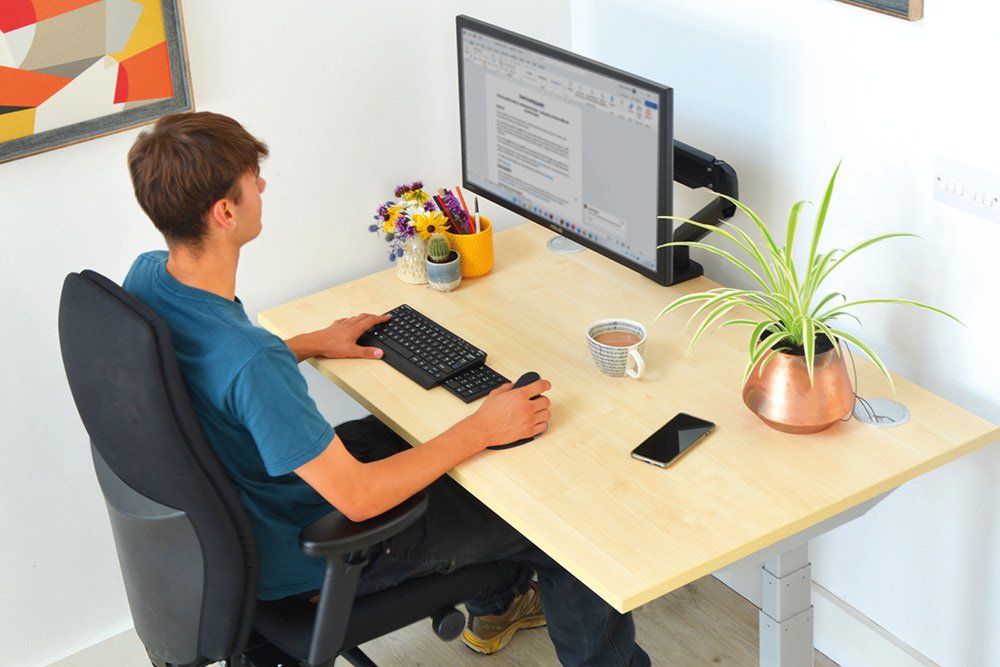
Desks with adjustable height let you change between sitting and standing. This reduces back pain and improves energy.
Choose desks with easy controls, like hand cranks or electric buttons, for quick adjustments.
- Sit-stand desks help reduce fatigue
- Electric controls offer smooth height changes
- Manual adjustments are budget-friendly
Space-saving Designs
Small spaces need desks that fit well without crowding. Look for compact designs that use space wisely.
Foldable or corner desks can keep your room open and organized.
- Wall-mounted desks save floor space
- Corner desks use unused corners
- Foldable desks can be stored away
Material And Durability
Choose strong materials to make sure your desk lasts a long time. Good materials support your equipment well.
Wood, metal, and laminated surfaces are common. Each has its own look and strength.
- Wood offers a classic and warm feel
- Metal is strong and modern
- Laminated desks resist scratches and stains
Credit: medium.com
Ergonomic Chair Features
An ergonomic chair helps keep your body comfortable during work. It supports your posture and reduces pain.
Choosing the right chair can improve your focus and health at your home office.
Lumbar Support Benefits
Lumbar support keeps the lower back in its natural curve. This support reduces strain and prevents slouching.
- Reduces lower back pain
- Improves posture
- Supports spine alignment
- Prevents muscle fatigue
Adjustability And Comfort
An adjustable chair lets you change height, armrests, and tilt. This customization fits different body types and tasks.
| Feature | Benefit |
| Seat Height | Aligns feet flat on floor |
| Armrest Height | Supports arms and reduces shoulder strain |
| Backrest Tilt | Allows comfortable reclining |
| Seat Depth | Supports thighs without pressure |
Breathable Materials
Breathable fabrics keep you cool and dry while sitting. They prevent heat buildup and sweat.
Common breathable materials include:
- Mesh fabric
- Knitted polyester
- Ventilated foam
Monitor Placement Tips
Setting up your monitor correctly helps you work comfortably. Good placement reduces neck and eye strain.
Here are some tips for placing your monitor in an ergonomic home office.
Optimal Height And Distance
Place your monitor so the top is at or slightly below eye level. This helps keep your neck straight.
Keep the monitor about 20 to 30 inches from your eyes. This distance prevents eye strain and keeps text clear.
- Top of screen at eye level
- 20-30 inches from eyes
- Screen tilted slightly upward
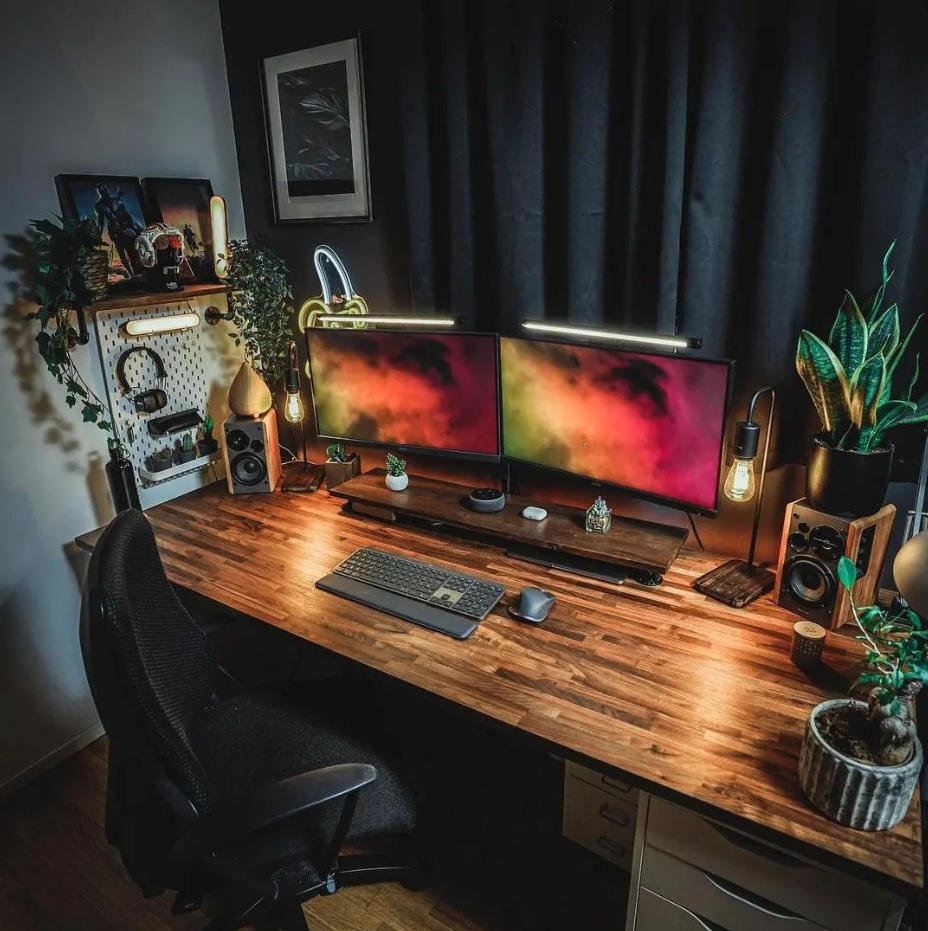
Dual Monitor Setup
Place two monitors side by side with a small gap between them. Align the top edges for comfort.
If you use both screens equally, position them directly in front of you. If one is main, center that one.
- Place monitors close together
- Align top edges evenly
- Center main monitor to your body
- Angle monitors slightly inward
Reducing Glare And Eye Strain
Position your monitor to avoid glare from windows and lights. Glare causes eye discomfort and headaches.
Use blinds or curtains to control sunlight. Adjust screen brightness and contrast to suit your room lighting.
- Keep monitor away from direct light
- Use curtains or blinds if needed
- Adjust screen brightness regularly
- Take breaks to rest your eyes
Credit: medium.com
Keyboard And Mouse Positioning
Proper keyboard and mouse placement helps reduce strain and discomfort. Ergonomic setups support long hours of work without pain.
Small changes in position can improve wrist posture. This guide covers wrist support, keyboard choices, and mouse alternatives.
Wrist Support Solutions
Wrist support reduces pressure on your joints. It keeps your wrists straight and relaxed while typing or using a mouse.
- Use a cushioned wrist rest to support your palms.
- Adjust keyboard height to keep wrists level.
- Take short breaks to stretch your wrists often.
- Keep your elbows close to your body for better alignment.
Ergonomic Keyboard Choices
Choosing the right keyboard can improve comfort and speed. Ergonomic keyboards help keep your hands in a natural position.
| Keyboard Type | Key Features | Best For |
| Split Keyboard | Separated halves to reduce wrist twisting | Long typing sessions |
| Mechanical Keyboard | Tactile feedback and less finger fatigue | Typing accuracy |
| Compact Keyboard | Smaller size saves desk space | Limited space setups |
| Ergonomic Curved Keyboard | Natural hand shape design | Wrist comfort |
Mouse Alternatives
Standard mice can cause wrist strain. Alternatives offer different grips and movements to reduce discomfort.
Consider these mouse alternatives:
- Vertical Mouse: Keeps wrist in a handshake position.
- Trackball Mouse: Moves cursor by rolling a ball with fingers.
- Touchpad: Allows finger gestures without wrist movement.
- Pen Mouse: Works like a pen for precise control.
Lighting For Focus And Comfort
Creating an ergonomic home office involves more than just furniture. Lighting plays a key role in enhancing productivity and comfort.
Let’s explore how you can optimize lighting for focus and comfort in your home office setup.
Natural Light Integration
Natural light can boost mood and focus. Position your desk near a window to make the most of daylight.
Task Lighting Options
Task lighting is essential for detailed work. Desk lamps with adjustable arms are ideal.
- LED lamps for energy efficiency
- Adjustable brightness levels
- Flexible necks for targeted lighting
Avoiding Screen Glare
Screen glare can cause eye strain and headaches. Position your monitor perpendicular to windows.
| Problem | Solution |
| Glare from windows | Use anti-glare filters |
| Overhead light reflection | Install dimmable lights |
| Reflections from desk | Choose matte surfaces |

Credit: geekyminded.com
Organizing For Efficiency
Keeping your home office tidy helps you work better. A clean space lowers stress and saves time.
Good organization means everything has a place. It makes your daily tasks smooth and quick.
Cable Management Ideas
Messy cables can distract and clutter your desk. Organize them to keep your workspace neat.
Use clips or ties to bundle cables together. Label each cable for quick identification.
- Use cable sleeves or tubes to group wires
- Attach cables under the desk with adhesive clips
- Keep power strips off the floor to avoid dust
- Label cables with tags or colored tape
Storage Solutions
Good storage keeps your supplies within reach but out of sight. This reduces desk clutter.
Choose storage that fits your space and needs. Drawers, shelves, and boxes all work well.
- Use drawer organizers to separate small items
- Install floating shelves to save floor space
- Pick stackable boxes for easy access
- Use clear containers to see contents quickly
Minimalist Desk Setup
A simple desk setup helps you focus. Remove extra items and keep only what you need.
Choose a clean desk with few decorations. Keep tools and devices organized and easy to reach.
- Keep desk surface clear except for essentials
- Use wireless devices to reduce cable clutter
- Limit decorations to one or two items
- Store papers and notebooks in a drawer or folder
Incorporating Wellness Elements
Creating an ergonomic home office is important for health. Adding wellness elements can improve your work experience. It keeps you comfortable and productive throughout the day.
There are many ways to make your office healthier. Consider standing desks, plants, and regular movement. These changes can make a big difference in how you feel.
Standing Desk Benefits
Standing desks help you stay active while working. They reduce the time you spend sitting. This can lead to better posture and less back pain.
Using a standing desk can also boost energy levels. You may feel more alert and focused on your tasks. It’s an easy way to add movement to your day.
- Improves posture
- Reduces back pain
- Increases energy levels
Incorporating Plants
Plants make your office look nice and feel fresh. They can improve air quality by removing toxins. This leads to a healthier environment.
Having plants around can also reduce stress. They add a calming effect to your workspace. Choose easy-to-care-for plants like succulents or ferns.
- Improves air quality
- Reduces stress
- Adds natural beauty
Movement And Stretching Tips
Regular movement is key to a healthy workday. Take short breaks to stretch and walk around. This helps prevent stiffness and fatigue.
Set a timer to remind you to move every hour. Simple stretches can relax your muscles and improve circulation. This keeps you feeling good all day.
- Stand up every hour
- Do simple stretches
- Take short walks
Frequently Asked Questions
What Is The Best Ergonomic Chair For Home Offices?
The best ergonomic chair supports natural posture and reduces strain. Look for adjustable height, lumbar support, and breathable material. This ensures comfort during long work hours and boosts productivity.
How Can I Improve My Home Office Ergonomics?
Improve ergonomics by adjusting your chair, desk, and monitor height. Use a keyboard and mouse that reduce wrist strain. Proper lighting and decluttered space also enhance comfort and focus.
Why Is An Ergonomic Desk Important For Home Offices?
An ergonomic desk promotes good posture and reduces back pain. Adjustable desks allow alternating between sitting and standing, improving circulation and energy. This setup enhances overall health and work efficiency.
How Do I Set Up My Monitor Ergonomically?
Place your monitor at eye level, about 20-30 inches away. The top of the screen should align with your eyes. This prevents neck strain and promotes a natural viewing angle.
Conclusion
Creating a comfortable home office helps you work better every day. Choose a chair that supports your back and a desk at the right height. Good lighting reduces eye strain and keeps you focused. Keep your workspace tidy to feel calm and organized.
Small changes can make a big difference in how you feel. Start with one idea and build your perfect setup over time. Your body and mind will thank you for it.