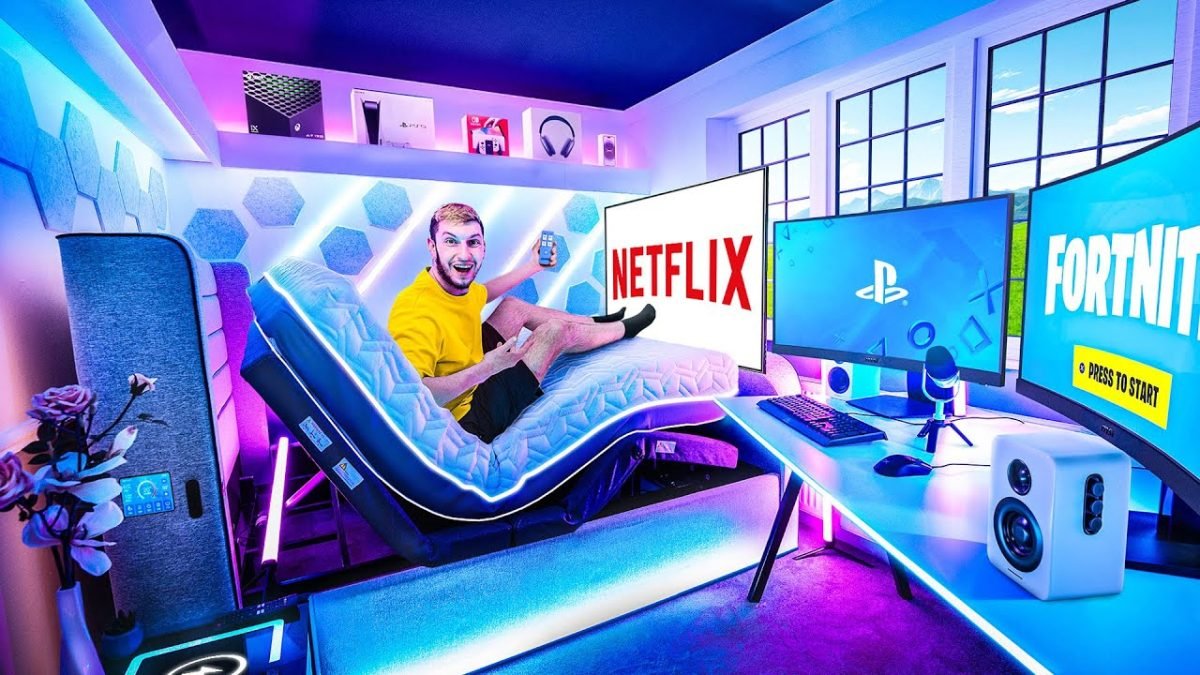
Imagine stepping into your bedroom and instantly feeling ready to dive into your favorite game. Your gaming game bedroom setup isn’t just about a desk and a screen—it’s about creating a space that powers your focus, boosts your comfort, and makes every gaming session unforgettable.
If you want to level up your room to match your passion, keep reading. This guide will show you how to build a gaming sanctuary that feels just right for you.
Choosing The Right Space
Creating a gaming setup in your bedroom needs the right space. Picking the best spot helps you play comfortably for hours.
Think about how much room you have and how you want to feel while gaming. The space you choose affects your focus and fun.
Assessing Room Size
Check how big your bedroom is before setting up your gaming area. A small room may feel crowded with big furniture.
Make sure you have enough space for your desk, chair, and gear. Leave room to move around without bumping into things.
- Measure the length and width of your room
- Plan space for desk, chair, and shelves
- Allow at least 3 feet of walking space
- Consider future equipment or upgrades
Lighting Considerations
Good lighting helps reduce eye strain during long gaming sessions. Natural light is best but can cause screen glare.
Use soft, adjustable lighting near your setup. Avoid bright lights behind the screen or direct sunlight on it.
- Place your desk near a window for natural light
- Use curtains to control sunlight
- Add LED or desk lamps with dimmers
- Choose cool or neutral white light bulbs
Noise Management
Reducing noise helps you focus on your game and enjoy sound effects. Bedrooms can have sounds from outside or other rooms.
Use noise control methods to keep the area quiet. This makes gaming more immersive and less distracting.
- Close doors and windows to block outside noise
- Use rugs or carpets to absorb sound
- Add curtains or wall hangings for noise dampening
- Consider noise-cancelling headphones
Essential Gaming Furniture
A good gaming setup needs the right furniture to support long play sessions. Choosing the right pieces helps comfort and performance.
This guide covers key furniture types that improve your gaming bedroom setup.
Ergonomic Chairs
Ergonomic chairs keep your body comfortable and reduce strain during gaming. They support your back and encourage good posture.
- Adjustable height and armrests for custom fit
- Lumbar support to protect your lower back
- Breathable material to keep you cool
- Swivel base for easy movement
Functional Desks
Your desk should offer enough space for monitors, keyboard, and accessories. It needs to be sturdy and at a good height.
| Feature | Benefit |
| Wide surface | More room for gaming gear |
| Cable management | Keeps wires tidy and safe |
| Adjustable height | Custom comfort and posture |
| Sturdy build | Supports heavy equipment |
Storage Solutions
Good storage keeps your gaming space clean and organized. It helps you find items quickly and protects your gear.
Consider these storage types:
- Drawers for small accessories like controllers and cables
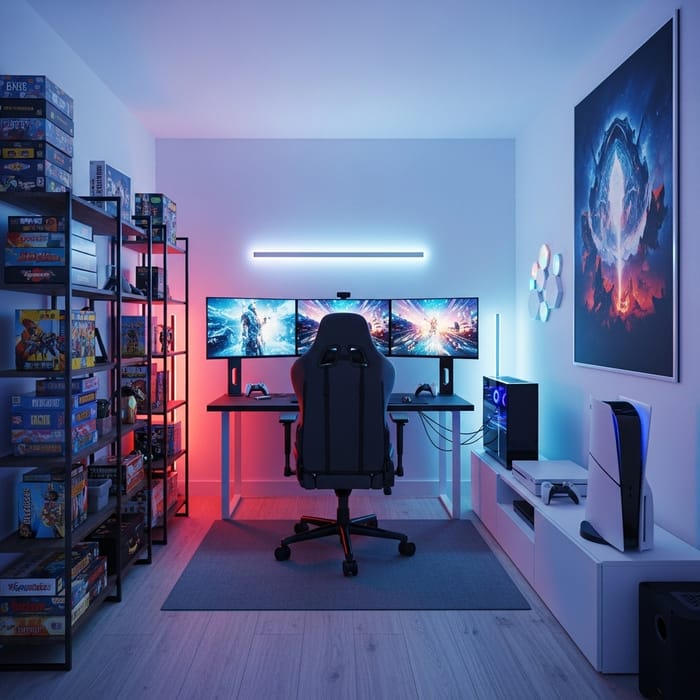
- Shelves to hold games, books, and collectibles
- Closet space for extra equipment and chairs
Tech Gear And Accessories
A good gaming bedroom setup needs the right tech gear and accessories. These tools help players enjoy games with ease and comfort.
Choosing the right equipment improves focus and makes long gaming sessions more fun. Let’s look at some key gear.
Monitors And Screens
Monitors show the game world in clear detail. A smooth screen helps players react faster.
Look for screens with a high refresh rate and low response time. Bigger screens give a better view of the game.
- Refresh rate of 120Hz or higher
- Response time less than 5ms
- Screen size between 24 and 32 inches
- Good color accuracy and brightness
Keyboards And Mice
Keyboards and mice help players control the game. Mechanical keyboards are popular for their quick response.
Gaming mice often have extra buttons and adjustable sensitivity. These features make gameplay easier and faster.
- Mechanical keyboards with tactile feedback
- Programmable keys for shortcuts
- Ergonomic mice with adjustable DPI
- Wired or wireless options
Headsets And Speakers
Good sound gear lets players hear game details and communicate with others. Headsets block outside noise.
Speakers offer loud and clear sound for a room. Choose gear with clear microphones for voice chat.
- Over-ear headsets for comfort
- Noise-canceling microphones
- Surround sound support
- Speakers with good bass and clarity

Credit: muzataled.com
Cable Management Tips
A clean gaming bedroom setup looks great and helps keep your space safe. Managing cables stops wires from tangling or getting damaged.
Good cable management also makes it easier to clean and move devices. Below are tips to help organize your gaming wires.
Organizing Wires
Start by sorting your cables by type and length. This helps reduce clutter and makes it easier to find what you need.
Use labels or colored tape to mark cables. This way, you will know which wire belongs to each device.
- Separate power cords from data cables
- Coil extra cable length neatly
- Use zip ties or Velcro straps to bundle wires
- Keep cables away from walkways to avoid trips
Using Cable Trays
Cable trays help hold wires off the floor and under your desk. They keep cables hidden and organized.
Choose trays that fit the size and number of your cables. Attach them securely to avoid falling wires.
- Mount trays under your desk or along walls
- Use trays with covers to protect cables
- Check trays regularly for dust and adjust cables
Maintaining Accessibility
Keep cables easy to reach for plugging and unplugging devices. Avoid hiding wires too deep or tight.
Plan your layout so you can access power strips and ports without moving equipment.
- Leave slack in cables near plugs
- Use cable organizers with easy-open features
- Arrange devices to reduce cable stretching
Decor And Ambiance
A gaming bedroom setup needs the right decor and ambiance. These elements create a space where you enjoy playing games.
Good decor makes the room comfortable and fun. It also reflects your style and gaming interests.
Lighting Effects
Lighting sets the mood in your gaming room. Use different lights to make the space exciting and cozy.
LED strips and smart bulbs help change colors with ease. Soft lights reduce eye strain during long game sessions.
- LED strip lights behind monitors or desks
- Smart bulbs to adjust brightness and color
- Desk lamps with adjustable angles
- Colored lights to match game themes
- Dim lighting for a relaxed feel
Wall Art And Posters
Wall art shows your favorite games and characters. Posters add color and personality to the room.
Choose art that inspires you or fits your gaming style. Frame posters to keep them neat and long-lasting.
- Posters of classic and new games
- Canvas prints of game landscapes
- Framed art of favorite characters
- Custom game-themed murals or decals
- Shelves to display game collectibles
Themed Decor Ideas
Themed decor makes your gaming room unique. Pick a theme that matches your favorite game or style.
Use furniture and decorations that fit the theme. This creates a fully immersive gaming space.
- Futuristic sci-fi theme with neon lights
- Retro arcade style with pixel art
- Fantasy theme with medieval props
- Minimalist design with clean lines
- Sports game theme with team colors

Credit: www.youtube.com
Optimizing Comfort And Health
Setting up a gaming bedroom is fun, but comfort and health matter too. It’s important to create a space where you can play for hours without strain.
Focus on proper posture, taking breaks, and ensuring good air quality. These help maintain your well-being during long gaming sessions.
Proper Posture Setup
Sitting correctly helps prevent back pain and fatigue. Make sure your chair supports your spine and keeps your feet flat on the floor.
Your monitor should be at eye level to avoid neck strain. Keep your keyboard and mouse within easy reach to maintain a natural position.
- Use an ergonomic chair
- Adjust monitor to eye level
- Keep feet flat on the ground
Break Time Strategies
Regular breaks are essential to keep your mind fresh and your body relaxed. Stand up and stretch every hour to improve circulation.
Short walks can help clear your mind. Use this time to hydrate and rest your eyes from the screen.
- Stand and stretch every hour
- Take short walks
- Drink water regularly
Air Quality And Ventilation
Good air quality is important for a healthy gaming environment. Ensure your room is well-ventilated to reduce stuffiness.
Consider using air purifiers to filter dust and allergens. Plants can also help keep the air fresh and clean.
- Keep windows open for ventilation
- Use air purifiers
- Add indoor plants
Personalizing Your Playspace
Your gaming bedroom setup can reflect who you are. Personal touches make it special and unique.
Explore ways to add character to your space. Use collectibles, colors, and memorabilia to craft your ideal gaming sanctuary.
Showcasing Collectibles
Display your favorite gaming collectibles with pride. They add charm and tell a story about your gaming journey.
- Use shelves to organize action figures
- Frame and hang posters of iconic games
- Display limited edition items on a dedicated shelf
Customizing With Colors
Colors change the mood of your gaming space. Choose hues that match your style and enhance your environment.
Consider these color palettes:
- Blue and White:Cool and calming
- Red and Black:Bold and intense
- Green and Gray:Refreshing and balanced
Incorporating Gaming Memorabilia
Bring your favorite gaming memories to life. Memorabilia connects you to the games you love.
| Memorabilia Type | Placement Idea |
| Game Posters | Frame and place above your desk |
| Collectible Figures | Arrange on wall-mounted shelves |
| Signed Merchandise | Showcase in a glass cabinet |
Credit: easy-peasy.ai
Frequently Asked Questions
What Are The Essentials For A Gaming Game Bedroom Setup?
A gaming bedroom setup needs a comfortable chair, a quality desk, and a powerful PC or console. Good lighting and sound systems enhance the experience. Cable management keeps the space tidy and organized.
How To Optimize Space In A Gaming Bedroom?
Use vertical shelving to store games and gear. Choose a compact desk and multi-functional furniture. Keep cables organized with clips or sleeves. Maximize floor space by mounting monitors on the wall.
What Lighting Works Best For Gaming Bedrooms?
Soft, adjustable LED lighting reduces eye strain and creates ambiance. RGB lights add a fun gaming vibe. Avoid harsh overhead lights to maintain comfort during long sessions.
How Important Is Sound Setup In A Gaming Bedroom?
Sound is crucial for immersion and communication. Use quality headphones or speakers with surround sound. Soundproofing the room minimizes external noise and improves focus.
Conclusion
A great gaming bedroom setup makes playtime more fun and comfortable. Choosing the right chair, desk, and lighting matters a lot. Keep your space neat to stay focused and relaxed. Small touches like soundproofing or decorations add personality. Your setup should match your style and needs.
Enjoy gaming in a space that feels just right. Simple changes can bring big comfort and joy. Create your perfect gaming corner and have fun every day.
