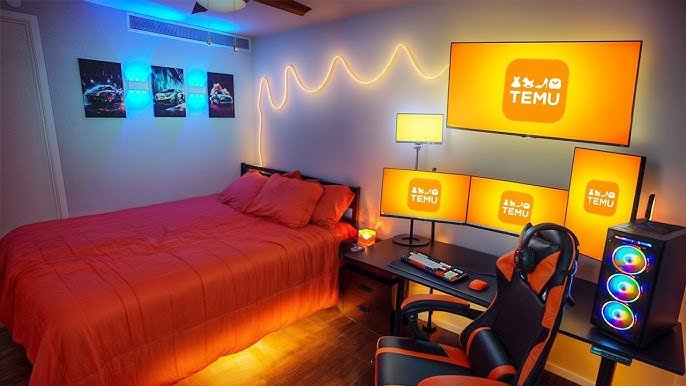
Imagine stepping into your bedroom and instantly feeling ready to dive into your favorite game. Your gaming setup isn’t just about having the right gear—it’s about creating a space that boosts your focus, comfort, and excitement every time you play.
If you want to transform your bedroom into the ultimate gaming zone, this guide is for you. Keep reading to discover simple tips and smart ideas that will make your gaming setup not only look amazing but also level up your entire gaming experience.
Your perfect gaming space is closer than you think!
Choosing The Right Space
Setting up a gaming area in your bedroom needs careful thought. You want a spot that fits your gear and feels comfortable.
Picking the right space helps you enjoy gaming without distractions or discomfort.
Maximizing Bedroom Layout
Look for a corner or wall space that leaves room to move. Avoid blocking doors or windows. Keep cables tidy to prevent trips.
- Choose a spot near power outlets
- Keep your desk away from foot traffic paths
- Use shelves to save floor space
- Place your chair with enough space to move freely
- Ensure your setup does not block natural light sources
Lighting Considerations
Good lighting reduces eye strain and improves focus. Natural light is best but avoid glare on your screen.
| Type | Best Use | Notes |
| Natural Light | Daytime gaming | Position desk perpendicular to windows |
| Desk Lamp | Focused task lighting | Use adjustable lamps with soft white bulbs |
| Ambient Light | General room lighting | Use dimmable ceiling lights or LED strips |
Noise Control Tips
Reduce noise to keep your gaming sessions calm. Soft surfaces absorb sound better than hard ones.
- Use rugs or carpets on the floor
- Add curtains or thick drapes to windows
- Place pillows or cushions on chairs
- Consider foam panels on walls for sound absorption
- Close doors and windows to block outside noise

Credit: www.reddit.com
Essential Gaming Gear
Setting up your gaming space in the bedroom needs the right tools. Good gear helps you play better and enjoy more.
This guide covers three key areas: chairs, monitors, and input devices. Each one makes a big difference in your gaming comfort and experience.
Best Gaming Chairs For Comfort
A good chair supports your back and keeps you comfortable for long sessions. Look for adjustable height and good padding.
- Ergonomic design to reduce strain
- Adjustable armrests and seat height
- Breathable materials to avoid sweating
- Sturdy base with smooth wheels
- High backrest for neck and shoulder support
Top Monitors For Immersive Play
Monitors with fast refresh rates and low response times show smooth action. Size and resolution affect how you see the game.
| Monitor Feature | Benefit |
| Refresh Rate (Hz) | Smoother motion |
| Response Time (ms) | Less blur |
| Screen Size (inches) | Better viewing area |
| Resolution | Sharper images |
| Panel Type | Color accuracy and viewing angles |
Keyboards And Mice Selection
Choose keyboards and mice that fit your play style. Mechanical keyboards offer good feedback. Mice with adjustable DPI improve precision.
Important features to consider:
- Mechanical or membrane keyboard types
- Programmable keys for shortcuts
- Mouse DPI settings for sensitivity
- Ergonomic design to reduce hand fatigue
- Wired or wireless options
Desk And Storage Solutions
A good gaming setup needs a strong desk and smart storage. The desk holds your gear. Storage keeps your space neat.
Choosing the right desk and storage helps you play longer and stay organized. It also makes your room look better.
Ergonomic Desk Options
An ergonomic desk helps you play without strain. It keeps your body comfortable and safe during long sessions.
Look for desks with adjustable height or angled surfaces. These help keep your wrists and back in good posture.
- Sit-stand desks let you change position often
- Desks with curved edges reduce wrist pressure
- Spacious desks fit multiple screens and accessories
- Compact desks work well in small bedrooms
Cable Management Tricks
Cables can make your gaming area messy and unsafe. Good cable management keeps wires hidden and untangled.
Use cable clips, sleeves, or trays under the desk. Label cables to find devices quickly and avoid confusion.
- Attach cable clips under the desk to hold wires
- Use cable sleeves to group many cables together
- Place a cable tray under the desk for power strips
- Label cables with tags or colored tape
Organizing Accessories And Games
Organize your accessories and games for easy access. This keeps your desk clear and your games safe.
Shelves, drawers, and boxes help store controllers, headsets, and games neatly. Sort items by use or type.
- Use small shelves for game cases and controllers
- Drawers keep cables, chargers, and small items hidden
- Use clear boxes to see accessories at a glance
- Group games by platform or genre for quick finding

Credit: www.youtube.com
Tech Setup And Connectivity
Setting up a gaming space in your bedroom requires thoughtful planning. Tech setup and connectivity are key components for an optimal gaming experience.
From high-speed internet to reliable sound systems, each element plays a crucial role. Power management ensures your devices are safe and efficient.
Optimizing Internet For Gaming
Internet speed and stability are vital for gaming. A fast connection reduces lag and enhances gameplay.
- Use a wired connection for lower latency
- Upgrade to a high-speed internet plan
- Place the router in a central location
- Limit background downloads during gaming
Sound Systems And Headsets
Quality sound immerses you in the game world. A good headset or speaker system makes all the difference.
- Choose a headset with noise-cancellation
- Consider surround sound speakers for a full experience
- Adjust volume settings to protect your hearing
Power Management And Safety
Proper power management protects your gaming equipment. Safety measures prevent damage from power surges.
| Device | Protection Type |
| PC | Surge Protector |
| Console | Uninterruptible Power Supply (UPS) |
| Monitor | Voltage Regulator |
Decor And Ambiance
Setting up a gaming space in your bedroom is fun and personal. The right decor and ambiance make gaming more enjoyable.
Simple changes in lighting, themes, and personal items help create a cozy and inspiring space.
Themed Room Decor Ideas
Choose a theme that fits your favorite games or styles. Themes make the room feel special and unique.
You can use posters, wall art, and furniture that match your theme. Themes can be retro, futuristic, or fantasy-based.
- Use game posters or decals on walls
- Select furniture in colors matching your theme
- Add themed pillows and blankets
- Display action figures or collectibles
Led Lighting And Effects
LED lights add color and mood to your gaming area. They make the space feel more alive and exciting.
Use strip lights behind your desk or around shelves. Change colors to match your game or mood.
- Install RGB LED strips for flexible colors
- Use smart bulbs to control brightness and hues
- Add light panels for a modern look
- Sync lights with your games for effects
Personalizing With Memorabilia
Show off your favorite gaming memories with collectibles and souvenirs. They give your space a personal touch.
Place items like game cases, figures, or signed posters where you can see them. These pieces tell your gaming story.
- Display game boxes on shelves
- Frame signed posters or artwork
- Arrange collectibles on desks or shelves
- Use themed storage for small items

Credit: www.youtube.com
Comfort Enhancements
Creating a cozy gaming setup in your bedroom helps you enjoy long sessions. Comfort is key to stay focused and relaxed.
Small changes can make your gaming space more inviting and less tiring. Let’s explore simple ways to improve comfort.
Temperature Control Tips
Keeping your gaming area cool or warm is important. Proper temperature stops you from feeling too hot or cold.
Use fans, heaters, or air conditioners to keep the air fresh. Open windows for natural airflow when possible.
- Place a small fan near your setup
- Use a portable heater in cold months
- Install blackout curtains to block heat
- Keep windows open for fresh air
- Use a thermostat to control room temperature
Seating Alternatives
A good seat helps you play longer without pain. Try different seating options to find what feels best.
Look for chairs with good back support or consider floor seating if you want a casual style.
- Ergonomic gaming chairs support your spine
- Bean bags offer soft and flexible seating
- Floor cushions keep you close to the desk
- Adjustable stools help with posture
- Use footrests to reduce leg strain
Break Area Setup
Taking breaks helps your eyes and body rest. Create a small space to relax near your gaming area.
Use this area to stretch, drink water, or just sit quietly before playing again.
- Add a comfy chair or small couch
- Keep water and snacks nearby
- Use soft lighting to relax your eyes
- Place some plants for a calming effect
- Include a small table for books or devices
Frequently Asked Questions
What Is The Best Desk For A Bedroom Gaming Setup?
A compact, sturdy desk with cable management suits bedroom gaming. Look for adjustable height and enough space for monitors and accessories.
How To Optimize Lighting For A Bedroom Gaming Setup?
Use soft, adjustable LED lights to reduce eye strain. Avoid harsh overhead lights and consider RGB strips for ambiance.
Which Gaming Chair Fits Well In Small Bedrooms?
Choose an ergonomic, slim-profile chair with lumbar support. It should be comfortable but compact to save bedroom space.
How To Manage Cables In A Bedroom Gaming Setup?
Use cable clips, sleeves, or under-desk trays to keep cables tidy. This prevents clutter and enhances setup aesthetics.
Conclusion
Creating a gaming setup in your bedroom can boost your fun and comfort. Choose the right desk, chair, and lighting for long sessions. Keep cables tidy to avoid distractions and accidents. Add personal touches like posters or LED lights to feel at home.
A clean, organized space helps you focus better. Enjoy gaming in a cozy, quiet spot without leaving your room. Small changes can make a big difference in your playtime. Start with basics, then improve as you go. Your bedroom can become the perfect gaming spot.