Your home office lighting setup can make or break your workday. Imagine feeling tired, distracted, or even stressed just because your lighting isn’t right.
You deserve a workspace that boosts your focus and keeps you energized from morning to night. You’ll discover simple changes that can transform your home office into a bright, comfortable, and productive environment. Keep reading to find out how to light your space in a way that supports your best work every day.
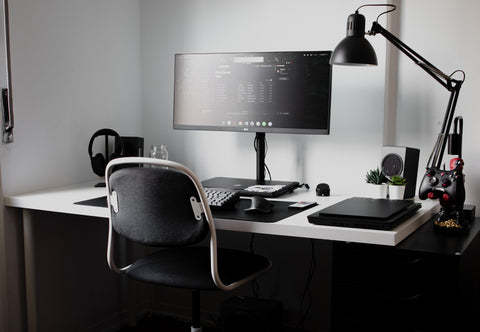
Credit: www.ankurlighting.com
Choosing The Right Light
Setting up good lighting in your home office helps you work better. The right light reduces eye strain and keeps you alert.
Choosing the right light means thinking about natural and artificial light, color temperature, and brightness levels.
Natural Vs Artificial Light
Natural light comes from the sun. It is soft and changes during the day. It helps improve mood and focus.
Artificial light comes from lamps and bulbs. It lets you work any time, even when it is dark outside. You can control its direction and strength.
- Natural light is best during the day
- Artificial light works anytime
- Use curtains to reduce glare from natural light
- Place lamps to avoid shadows on your desk
Color Temperature Effects
Color temperature shows how warm or cool a light looks. It is measured in Kelvins (K). Warm light is yellowish. Cool light is bluish.
Warm light feels cozy and calm. Cool light feels bright and sharp. Cool light helps you stay awake and focus better.
| Color Temperature | Kelvins (K) | Effect |
|---|---|---|
| Warm Light | 2700K – 3000K | Cozy and relaxing |
| Neutral Light | 3500K – 4100K | Balanced and natural |
| Cool Light | 5000K – 6500K | Bright and alert |
Brightness Levels
Brightness means how much light you have in your workspace. Too little light makes it hard to see. Too much light causes glare.
Use adjustable lamps to control brightness. Aim for a soft, even light to reduce shadows and eye strain.
- Desk lamps should have 450 to 800 lumens
- Overhead lights should be bright but not harsh
- Use dimmers to adjust light during different times
- Avoid direct light in your eyes or on screens
Types Of Lighting Fixtures
Good lighting helps you work better in your home office. It keeps your eyes comfortable and your mind alert.
There are different types of lighting fixtures. Each type has its own purpose and benefits.
Desk Lamps
Desk lamps focus light directly on your work area. They help reduce eye strain by lighting up papers and keyboards.
Many desk lamps have adjustable arms or heads. This lets you change the light angle and brightness as you need.
- Adjustable brightness and direction
- Saves space on your desk
- Good for close-up tasks
Overhead Lighting
Overhead lighting lights up the whole room evenly. It creates a bright and clear workspace.
Types of overhead lights include ceiling lights and recessed lights. These help you see well without harsh shadows.
- Ceiling-mounted fixtures
- Recessed lights in the ceiling
- LED panels for wide coverage
Task Lighting Options
Task lighting helps with specific jobs like reading or writing. It adds extra light where you need it most.
Some task lights are clip-on lamps or swing-arm lights. They can be moved or angled easily for better focus.
- Clip-on lamps for flexible use
- Swing-arm lights for adjustable reach
- Under-shelf lights to brighten small areas
Lighting Placement Tips
Good lighting helps you work better at your home office. Placing lights the right way makes your space bright and comfortable.
Use the right spots for lights to avoid eye strain and keep your workspace clear and inviting.
Avoiding Glare And Shadows
Glare and shadows can make it hard to see your screen or paperwork. Place lights so they do not shine directly on your monitor.
Use soft, diffused light to reduce harsh reflections. Adjust blinds or curtains to control natural light and avoid bright spots.
- Position lights to the side or behind your monitor
- Use lamps with shades to soften light
- Avoid overhead lights that create shadows on your desk
- Control window light with curtains or blinds
Optimal Desk Setup
Place your desk near a natural light source but not in direct sunlight. This keeps your workspace bright without glare.
Keep your main light behind or beside your screen. This reduces reflections and helps your eyes focus better.
- Face a window to get soft, natural light
- Keep your desk clear to let light spread evenly
- Use adjustable lamps to direct light where needed
Balancing Ambient And Task Light
Use ambient light to brighten the whole room softly. Add task lighting for focused work on your desk or keyboard.
Mixing both types avoids eye strain and keeps your workspace comfortable all day.
- Use ceiling lights or floor lamps for ambient light
- Add desk lamps with adjustable brightness for tasks
- Choose warm light to reduce harshness
- Turn off extra lights when not needed
Smart Lighting Solutions
Smart lighting makes your home office more comfortable and efficient. You can control lights with apps or voice commands.
These systems help reduce eye strain and save energy. They fit any work style and room setup.
Adjustable Brightness
Adjustable brightness lets you change light levels easily. Bright light helps you stay alert during work.
Dim light can create a calm mood for breaks or video calls. You can set the brightness with a remote or app.
- Increase brightness for detailed tasks
- Lower brightness for relaxing moments
- Save energy by reducing light when not needed
Color Changing Features
Color changing lights let you pick different colors for your workspace. Cool colors help you focus and stay alert.
Warm colors create a cozy feeling for breaks or late work sessions. You can control colors from your phone or smart device.
- Use blue or white for concentration
- Use red or orange for warmth
- Change colors to match your mood
Voice-controlled Systems
Voice control lets you adjust lights without stopping work. You can turn lights on or off by speaking commands.
This feature works with popular voice assistants. It adds convenience and helps keep your hands free.
- Turn lights on or off with your voice
- Change brightness or color hands-free
- Set schedules using voice commands
Energy Efficiency
Setting up good lighting in your home office helps you work better. Using energy-efficient lights saves power and lowers bills.
Choosing the right lights can reduce your energy use and help the environment.
Led Vs Traditional Bulbs
LED bulbs use much less energy than traditional bulbs like incandescent or halogen. They last longer and stay cool.
Traditional bulbs use more electricity and burn out faster. LEDs save energy and need fewer replacements.
- LED bulbs use up to 80% less energy
- LEDs last 15 to 25 times longer
- Traditional bulbs waste energy as heat
- LEDs produce less heat and save cooling costs
Timers And Sensors
Timers turn lights off automatically after a set time. This stops lights running when you forget to switch them off.
Sensors detect movement and light levels. They switch lights on only when needed, saving energy during breaks or empty rooms.
- Timers reduce wasted light hours
- Motion sensors activate lights only when you are present
- Light sensors adjust brightness based on daylight
- Combining sensors and timers maximizes savings
Cost Savings
Using energy-efficient lighting lowers your electricity bills. LEDs and smart controls need less power and last longer.
Although LEDs cost more at first, they save money over time through lower energy use and fewer replacements.
- Lower energy consumption cuts monthly bills
- Long-lasting bulbs reduce purchase frequency
- Smart controls prevent unnecessary light use
- Energy savings grow as you use lights daily

Credit: www.youtube.com
Enhancing Mood And Focus
The right lighting in your home office can boost mood and focus. Choosing the correct setup can make a big difference in your work environment.
Explore how different light types and arrangements can support your daily tasks and improve your overall well-being.
Warm Vs Cool Light Benefits
Warm lights create a cozy and relaxing atmosphere. They are great for winding down after a long day. Cool lights, on the other hand, are energizing and help with focus.
- Warm light: Ideal for relaxation
- Cool light: Boosts alertness and concentration
- Balance both for a harmonious workspace
Circadian Rhythm Support
Lighting plays a key role in regulating your circadian rhythm. Natural light is best for keeping your body clock in sync.
| Time of Day | Recommended Light |
| Morning | Bright, cool light |
| Afternoon | Natural or neutral light |
| Evening | Warm, dim light |
Personalizing Your Space
Customize your lighting to match your personal preferences. Consider adding desk lamps or smart bulbs for adjustable light settings.

Credit: www.designcafe.com
Frequently Asked Questions
What Is The Best Lighting For A Home Office?
The best lighting combines natural light with adjustable LED lamps. It reduces eye strain and improves focus. Position lights to avoid glare on screens. Use warm white bulbs for comfort and productivity. Layer lighting sources for flexibility throughout the day.
How Can I Reduce Eye Strain From Office Lighting?
Use soft, diffused lighting and avoid harsh overhead lights. Position desk lamps to minimize screen glare. Take regular breaks to rest your eyes. Adjust monitor brightness to match room lighting. Consider blue light filters or glasses for added protection.
Why Is Adjustable Lighting Important In A Home Office?
Adjustable lighting allows you to control brightness and direction. It adapts to different tasks and times of day. This flexibility helps maintain focus and reduces fatigue. Adjustable lamps improve comfort and create a productive workspace. It also supports better posture and eye health.
How Does Natural Light Affect Home Office Productivity?
Natural light boosts mood, energy, and alertness. It helps regulate sleep cycles and reduces fatigue. Position your desk near windows for maximum benefit. Use sheer curtains to control glare without blocking light. Combining natural and artificial light creates an ideal work environment.
Conclusion
Good lighting makes working at home easier and more comfortable. It helps reduce eye strain and keeps you focused. Choose lights that suit your space and needs. Natural light is best, but soft lamps work well too. Adjust brightness to avoid glare on screens.
A well-lit home office supports better work habits and mood. Small changes in lighting can bring big benefits to your daily routine. Keep your workspace bright and inviting for better productivity every day.