Setting up your PC in your bedroom can be a game-changer for your productivity and comfort. Imagine having a space where you can work, game, or relax without distractions.
But how do you make sure your setup is both functional and cozy? You’ll discover simple tips and clever ideas to create the perfect PC setup in your bedroom. Whether you want to boost focus or enjoy your downtime, you’ll find everything you need right here.
Ready to transform your bedroom into your ideal tech haven? Let’s dive in.
Choosing The Right Spot
Setting up a PC in your bedroom needs careful thought. Picking the right spot makes working or gaming better.
A good spot helps with comfort, focus, and room use. Think about light, noise, and space before placing your PC.
Maximizing Natural Light
Natural light brightens your space and saves electricity. Place your PC near a window but avoid glare on the screen.
Use curtains or blinds to control light. This keeps the room bright without hurting your eyes or screen visibility.
- Position desk beside or facing a window
- Use light curtains to soften harsh sunlight
- Avoid direct sunlight on the screen
- Keep the area clean for better light reflection
Minimizing Noise Distractions
Noise can break your focus when using your PC. Choose a quiet corner away from doors and loud appliances.
Soft materials like rugs and curtains help reduce sound. Close windows to block outside noise when needed.
- Pick a spot far from noisy areas
- Add rugs or cushions to absorb sound
- Close doors and windows to lower noise
- Use noise-canceling headphones if needed
Optimizing Space Usage
Bedrooms can be small, so use space smartly. Pick a spot that fits your desk and allows free movement.
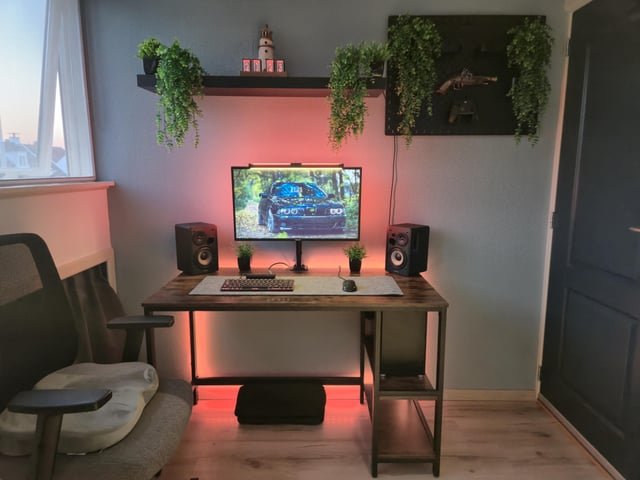
Use shelves or wall mounts to save desk space. Keep cables tidy to avoid clutter and accidents.
- Choose a corner or wall space for your desk
- Use vertical storage like shelves or hooks
- Keep cables organized with clips or ties
- Leave space to move around comfortably

Credit: www.youtube.com
Ergonomic Furniture Selection
Setting up a PC in your bedroom needs careful furniture choices. Good furniture helps keep your body comfortable and healthy. It reduces strain and supports better posture during long work or gaming sessions.
Picking the right ergonomic furniture makes your space more functional. It fits well in smaller rooms and helps you stay focused without pain or discomfort.
Comfortable Chair Options
Choosing a chair with good support is key. Look for chairs with adjustable height and backrests. A chair with lumbar support helps keep your lower back safe. Breathable fabric keeps you cool during long sitting hours.
- Ergonomic office chairs with adjustable features
- Mesh chairs for better airflow
- Chairs with padded armrests
- Swivel chairs for easy movement
Desk Types For Bedrooms
Desks for bedrooms should save space but still be sturdy. Compact desks fit well in small rooms. Wall-mounted desks free up floor space. Desks with storage help keep your setup tidy.
| Desk Type | Best For | Key Feature |
| Compact Desk | Small rooms | Small footprint |
| Wall-mounted Desk | Limited floor space | Folds when not in use |
| Desk with Storage | Organizing tools | Built-in drawers |
Adjustable Furniture Benefits
Adjustable furniture adapts to your body and tasks. It helps reduce muscle strain and keeps your posture correct. You can change the height or angle to match your comfort needs.
- Promotes better posture
- Reduces back and neck pain
- Improves focus and productivity
- Fits different users and uses
Effective Lighting Solutions
Setting up a PC in your bedroom needs good lighting. Proper lights help you work better and stay comfortable.
This guide covers task lighting, ambient lighting, and ways to reduce eye strain.
Task Lighting For Work
Task lighting focuses light on your work area. It helps you see details clearly and avoid shadows.
- Use an adjustable desk lamp to direct light where needed.
- Choose LED bulbs with cool white light for clear visibility.
- Place lamps to reduce glare on your screen.
- Keep the light source close but not too bright.
Ambient Lighting Ideas
Ambient lighting sets the room’s mood. It fills the space with soft light and lowers harsh contrasts.
| Lighting Type | Description | Example |
| Ceiling Light | Bright overall room light | Flush mount LED fixture |
| Wall Sconces | Soft light from walls | Warm LED sconces |
| Floor Lamps | Light from low angle | Uplight floor lamp |
| Smart Bulbs | Adjust color and brightness | Color-changing LED bulbs |
Reducing Eye Strain
Good lighting helps your eyes stay healthy and avoid fatigue during long computer use.
- Set screen brightness close to room light level.
- Use blue light filters or glasses in the evening.
- Take breaks every 20 minutes to rest your eyes.
- Position your monitor to avoid reflections and glare.
- Keep the room softly lit, not too dark or bright.

Credit: www.reddit.com
Cable Management Tips
Setting up a PC in your bedroom looks clean when cables are managed well. Messy wires can cause clutter and distractions.
Good cable management keeps your space neat and makes cleaning easier. It also helps protect your devices and yourself.
Hiding Wires Neatly
Hide wires behind your desk or furniture to keep them out of sight. Use cable channels or raceways to guide cables along walls or under desks.
Secure cables with clips or adhesive hooks to stop them from dangling. Tuck excess cable length into small boxes or cable sleeves to reduce clutter.
Using Cable Organizers
- Use cable ties or Velcro straps to bundle cables together.
- Label each cable with tags for easy identification.
- Place a power strip on your desk or mount it under the desk.
- Use cable sleeves to group several wires in one cover.
- Choose cable boxes to hide power strips and adapters.
Safety Considerations
| Safety Tip | Why It Matters |
| Keep cables away from water sources | Prevents electric shock and damage |
| Avoid overloading power strips | Reduces fire risk |
| Use cables with proper insulation | Protects from short circuits |
| Check cables regularly for wear | Prevents malfunction and hazards |
| Do not run cables under carpets | Stops overheating and tripping |
Optimizing Tech Setup
Setting up a PC in your bedroom needs careful planning. A good setup improves comfort and productivity. This guide helps you arrange your tech right.
Focus on choosing the right PC, placing your monitor well, and picking essential peripherals. These choices affect your daily use and space.
Choosing The Right Pc
Select a PC that fits your bedroom space and meets your needs. Smaller cases save room, while high performance suits demanding tasks.
- Consider a compact desktop or a laptop for tight spaces
- Check the noise level to avoid disturbance
- Choose a PC with enough USB ports for your devices
- Think about future upgrades and easy access inside the case
Monitor Placement And Size
Place your monitor at eye level to reduce neck strain. The right size helps you see clearly without moving your head too much.
| Monitor Size | Recommended Distance | Best Use |
| 21-24 inches | 20-24 inches | General use and browsing |
| 25-27 inches | 24-30 inches | Work and entertainment |
| 28 inches and larger | 30+ inches | Design, gaming, multitasking |
Peripheral Essentials
Choose peripherals that improve comfort and efficiency. Keep cables tidy and select devices that fit your space and needs.
Key peripherals to include:
- Ergonomic keyboard and mouse to reduce strain
- Headphones or speakers for clear sound
- Desk lamp with adjustable brightness
- USB hub to expand connectivity
- Mouse pad with wrist support
Enhancing Comfort
Setting up a PC in your bedroom can be both practical and comfortable. With the right approach, you can create an inviting space for work or play. This guide will help you enhance comfort with simple adjustments.
Focus on the key areas to make your bedroom PC setup more enjoyable. Here are some effective techniques to consider.
Temperature Control
Keeping your bedroom at a comfortable temperature is crucial. It helps you concentrate and feel at ease while using your PC.
- Use a fan or portable heater to adjust the temperature.
- Consider installing blackout curtains to block heat from sunlight.
- Regularly clean vents to ensure proper airflow.
Soundproofing Techniques
Reducing noise can greatly enhance your experience. Soundproofing keeps distractions at bay and creates a peaceful environment.
Add thick rugs or carpets to absorb sound.
Consider acoustic panels on walls for better sound insulation.
Seal any gaps around windows or doors to prevent noise leakage.
Adding Personal Touches
Personalizing your space makes it more inviting and comfortable. Add items that reflect your personality and preferences.
| Personal Touch | Example |
| Lighting | LED strips or desk lamps |
| Decor | Posters or art prints |
| Plants | Small succulents or ferns |
Boosting Productivity
Setting up your PC in the bedroom can improve how you work. The right setup helps you focus and get tasks done faster.
Organizing your space well is key. You need to think about distractions, time, and breaks.
Creating A Distraction-free Zone
A calm space makes it easier to concentrate. Remove anything that takes your attention away from work.
- Place your desk away from the bed
- Keep gadgets not needed for work out of sight
- Use noise-canceling headphones
Time Management Tools
Time tools can help you stay on track. They make sure you use your time wisely.
| Tool | Purpose |
| Calendar apps | Schedule tasks |
| Timers | Track work sessions |
| To-do lists | Organize daily tasks |
Incorporating Break Areas
Breaks help you recharge and improve focus. Create a space in your bedroom for short breaks.
Consider adding a small chair or mat for relaxation. A simple corner can make a big difference.

Credit: www.youtube.com
Frequently Asked Questions
What Is The Best Location For A Pc Setup In A Bedroom?
The best location is near a window for natural light and good ventilation. Avoid placing it near the bed to reduce distractions and maintain focus.
How Can I Organize Cables For A Bedroom Pc Setup?
Use cable organizers, clips, or sleeves to keep cables tidy. Label cables for easy identification and avoid clutter, improving both aesthetics and safety.
What Ergonomic Tips Improve Comfort For A Bedroom Pc Setup?
Choose an adjustable chair and desk. Position the monitor at eye level and keep wrists straight to reduce strain and enhance comfort during long usage.
How Do I Reduce Noise From A Pc Setup In A Bedroom?
Use silent or low-noise PC components and place the PC on a soft mat. Consider noise-cancelling headphones to minimize distractions and maintain a quiet space.
Conclusion
A bedroom PC setup can fit any space and style. Keep your desk clear and choose good lighting. Pick a comfortable chair to avoid back pain. Organize cables to keep the area neat. Add personal touches to make it yours.
Small changes can boost your focus and comfort. Enjoy your work or play time in a cozy spot. A smart setup makes long hours easier and more fun.